.svg)
.svg)


Algolia is the faster route to a polished search box. Elasticsearch is the better choice when you need deep control over how data is indexed, scored and analyzed, and you have engineers to run it. Most of the decision comes down to one question: do you want to buy a search experience, or build with a search toolbox?
We're a design and conversion agency, not a search vendor, so we come at this from the user's side of the search bar. We've watched good products lose customers because the search box returned nonsense. We've also watched teams burn a quarter on cluster tuning when a hosted service would have shipped in weeks. Here's how to choose.
What each tool actually is
The two products sit in the same category on paper, but they were built for different jobs.
Algolia is a hosted search-as-a-service platform. You send it records through an API, and it returns ranked results quickly. Its own engineering blog says it was created to address the shortcomings of database full-text search for app and web developers. Ranking, typo tolerance and the front-end libraries come packaged.
.jpeg)
Elasticsearch is a distributed search and analytics engine. You can run it yourself or use Elastic's managed cloud. It does site search, but it's just as commonly used for logs, observability and security analytics. One engineering write-up puts the contrast neatly: Algolia is an "experience" product, Elasticsearch a "data-toolbox" product (DEV Community). That framing holds up well in practice.
Side-by-side comparison
A prototype is not the same as production readiness. Time to launch depends on connectors, data quality, relevance, permissions, interface work and operational requirements. Compare both products using the same corpus, query set and acceptance criteria rather than treating vendor or competitor timelines as benchmarks.
Setup and developer experience
Algolia packages hosted indexing, ranking configuration and front-end libraries, which can reduce infrastructure work. Your team still needs to synchronise data, secure access, build the interface and test relevance. Trial the integration against your requirements rather than assuming a guaranteed launch time.
Elasticsearch asks more of you from day one. You decide on mappings, analyzers, shard counts and how you'll keep the index in sync with your database. None of that is bad. It's the price of flexibility. But it means someone on your team has to own it.
For self-managed Elasticsearch, plan capacity, backups, monitoring, upgrades and incident response. Managed hosted and serverless deployments change that workload, but do not remove responsibility for data modelling, relevance and application integration. Follow the guidance for your deployment rather than applying a generic memory rule.
Relevance: defaults versus control
This is where the "experience versus toolbox" split shows up most clearly.
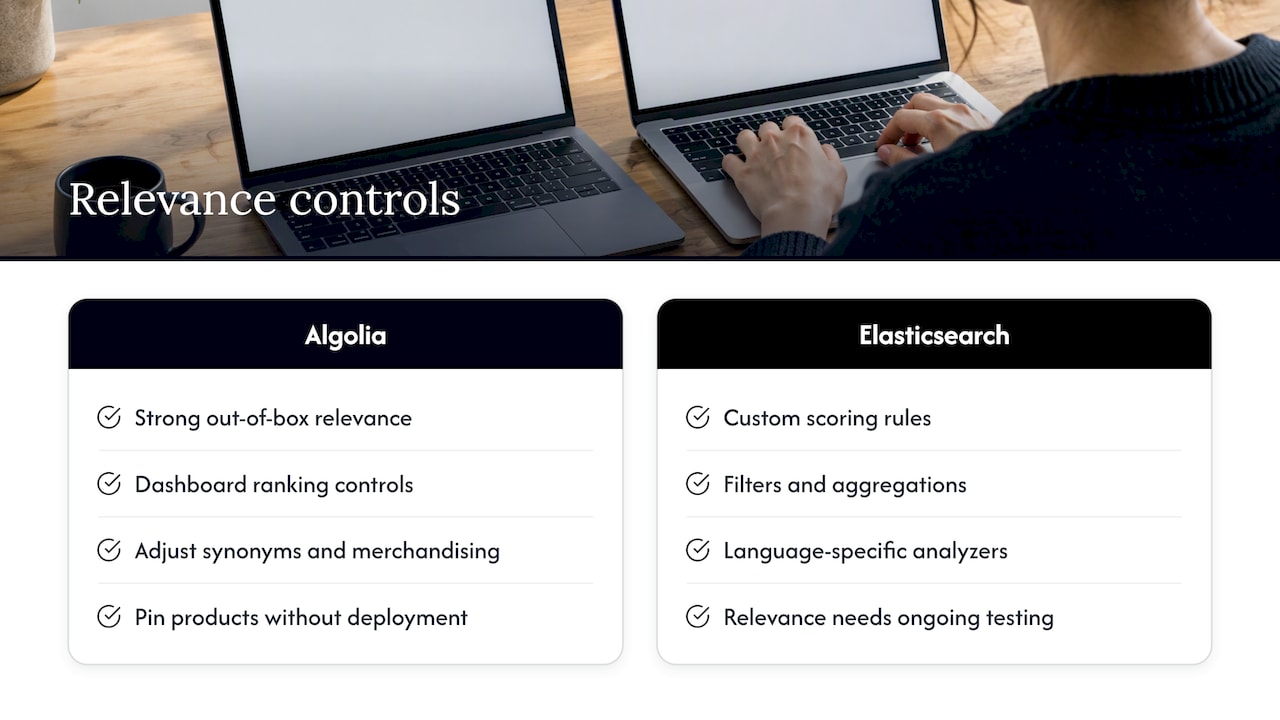
Algolia gives you strong relevance out of the box and a dashboard where non-engineers can adjust ranking, synonyms and merchandising. For a retail catalog or a documentation site, that's often exactly right. Your marketing team can pin a product to the top of a category without a deployment.
Elasticsearch gives you the raw mechanics. You can write custom scoring, combine full-text with filters and aggregations, handle multiple languages with different analyzers, and shape results for specialized document processing. The trade-off is that good relevance is something you build and keep testing, not something you switch on.
A useful test: write down ten real queries your customers type, including the misspelled and vague ones. Run them through both a trial Algolia index and a basic Elasticsearch setup. If the defaults already return good answers, you probably don't need the control. If you keep wanting to override scoring rules, you do.
What each one really costs
Pricing is the part most comparison pages blur, so here are the published numbers and what they leave out.
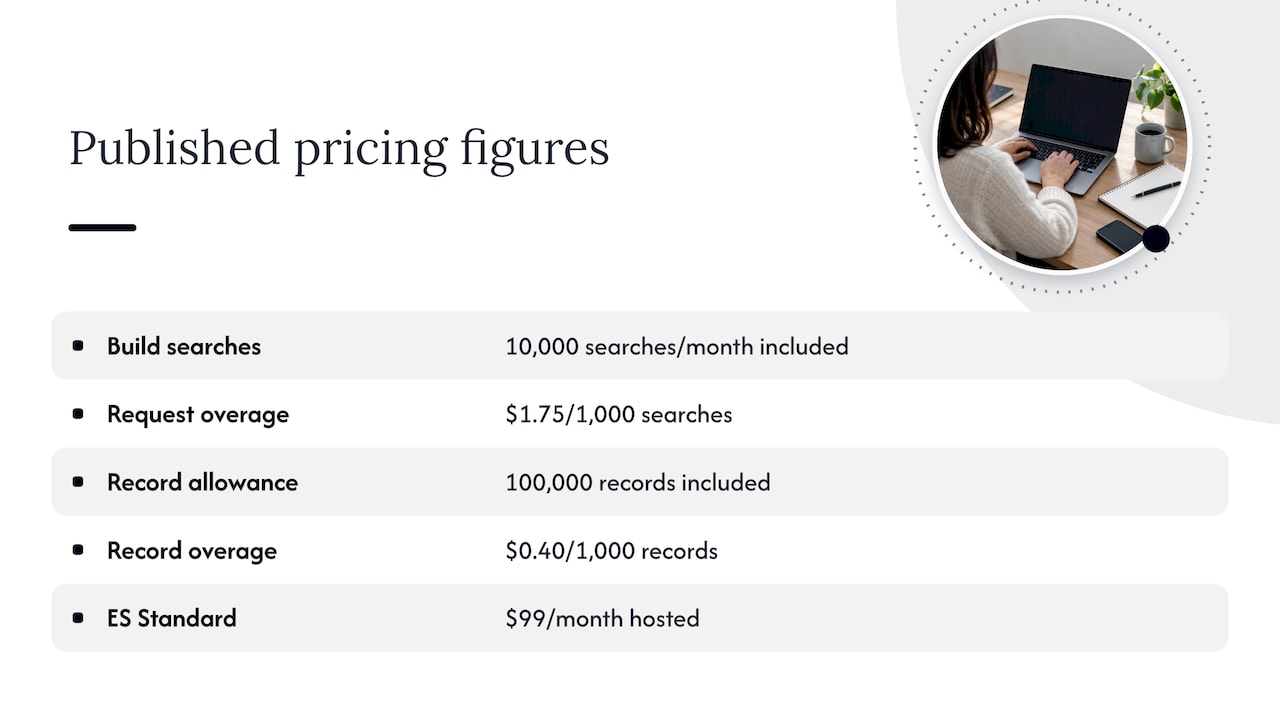
Algolia: its current pricing page separates Free, Grow, Grow Plus and enterprise options. Grow includes 10,000 monthly search requests, then $0.50 per additional 1,000; Grow Plus lists $1.75 per additional 1,000. Both list 100,000 included records and $0.40 per additional 1,000. Check feature access and billing terms for the exact plan.
Elasticsearch: licensing depends on the source, distribution and features you use. Consult Elastic's licensing FAQ rather than treating every distribution as AGPL. Compare hosted and serverless pricing, infrastructure, support and engineering effort. Self-management is not a zero-cost deployment.
A quick worked example
For an illustrative 500,000 monthly search requests, 490,000 exceed the included 10,000. At the listed Grow rate, request charges would be $245 per month; at Grow Plus, $857.50. These exclude extra records, add-ons, taxes and negotiated terms. Compare the same workload with Elastic's deployment estimate plus engineering and support costs.
This is also why people ask why Algolia feels expensive. Usage pricing scales with your success: every extra search costs money, including the ones from bots and autocomplete keystrokes if you count them that way. Check how your plan counts requests before you commit.
Why some teams leave Elasticsearch, and some leave Algolia
Both directions of migration happen, for different reasons.
According to Big Data Boutique, teams moving off Elasticsearch are less often driven by licensing worries and more by storage overhead, which can become a cost problem at scale for log-heavy workloads. The same guide notes that AGPL terms can trigger legal reviews in some organizations, which sends a few toward OpenSearch.
Teams can also reconsider hosted search when request volume, feature needs or commercial terms change. A migration cost comparison should include implementation, data synchronisation, relevance regression testing, operational support and rollback, not just the new hosting invoice.
A fair summary: Elasticsearch gets painful when you underestimate operations and storage. Algolia gets painful when traffic grows faster than your budget.
When neither is the right answer
For a modest catalog, documentation site or marketing site, trial alternatives such as Typesense, Meilisearch or your database's full-text search. Measure relevance, latency, memory, access control and maintenance on your workload; do not treat a sub-10ms claim as a guarantee across engines or deployments.
And if you're building semantic or vector search for AI features, the field is wider again, with dedicated vector databases in the mix.
How to choose: a short decision guide
- Who maintains it? No search or DevOps specialist on the team: lean Algolia (or a lighter hosted engine).
- What are you searching? Products, pages and help articles: Algolia fits. Logs, events, huge document stores or multi-source analytics: Elasticsearch.
- How fast must you launch? Weeks, not quarters: Algolia.
- Where must data live? Strict residency or self-hosting rules: Elasticsearch gives you more options.
- How will traffic grow? Model your request volume against Algolia's pricing, and model engineer time against Elasticsearch's.
- Who tunes relevance? Merchandisers and marketers: Algolia's dashboard. Engineers writing scoring logic: Elasticsearch.
Our perspective: the engine is not the experience
We get asked this question mostly by product teams who've already picked a side and want a design review of what comes next. Here's what we've seen.
The engine matters less than people expect. Users don't see Elasticsearch or Algolia. They see a search box, a results page, filters, empty states and the moment they decide to give up. We've found that a well-designed results page on a mediocre engine often beats a brilliant engine behind a confusing interface. Think of the engine as the plumbing: nobody compliments it, but everybody notices when it fails.
So before you compare vendors, look at search the way a customer does. What do people type? What do they click? What do they search for that returns nothing? That zero-result list is a free product roadmap. This is the same research-first approach we use across UX, UI and conversion work: look at behavior, form a hypothesis, test it, then decide what to build.
If you're an early-stage team, our bias is toward the option that gets you learning fastest. That usually means a hosted engine, a thin front end and real user feedback in weeks, which is the thinking behind our Rapid MVP approach. You can always move to something more controllable once the data tells you search is a core differentiator.
For mature products, we'd push the opposite way: audit what search is doing to your funnel before you re-platform. Many migrations we'd call premature were really relevance, labeling or interface problems in disguise.
Getting more from search, whichever you choose
A few design habits pay off on either platform:
- Show helpful empty states. A "no results" page should suggest alternatives, popular items or a way to contact you.
- Make filters match how people think, not how your database is structured.
- Track queries with no clicks and no results. Review them monthly.
- Test autocomplete on mobile. Thumb-typing produces typos, so check that tolerance works.
- Measure search users separately. Visitors who use search often convert differently from those who browse, so compare their funnels.
If you're also rethinking how you measure all this, our guides to Google Analytics alternatives and indexing tools cover the measurement and visibility side.
Need a second opinion on your search experience?
If search is a conversion lever for your product, our Full UX/CRO Audit starts from $3,500 plus GST as a one-off. The UX/UI Design Team starts from $8,400 per month plus GST. Confirm scope and current pricing, or explore our web development and conversion rate optimisation services.