.svg)
.svg)

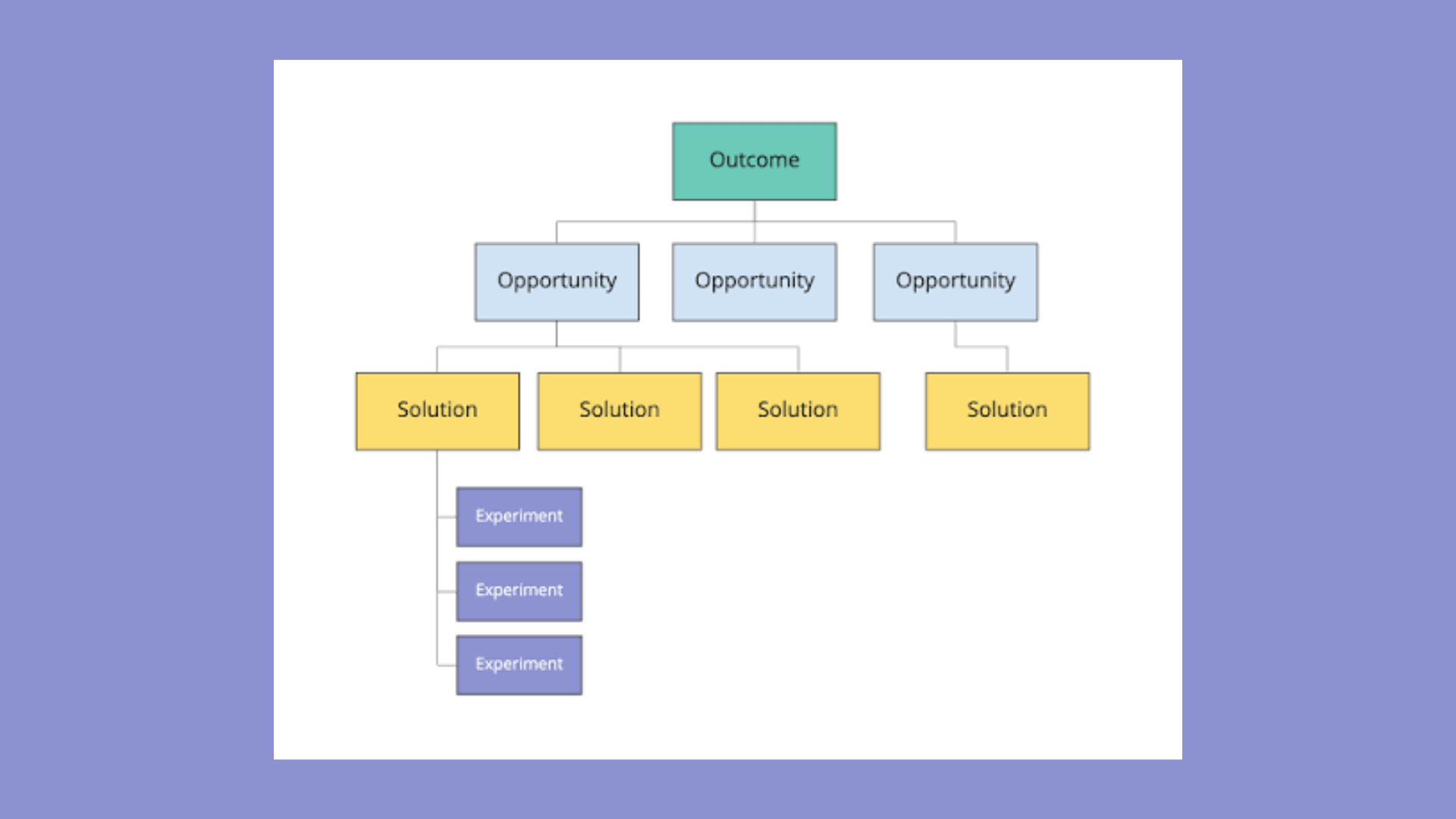

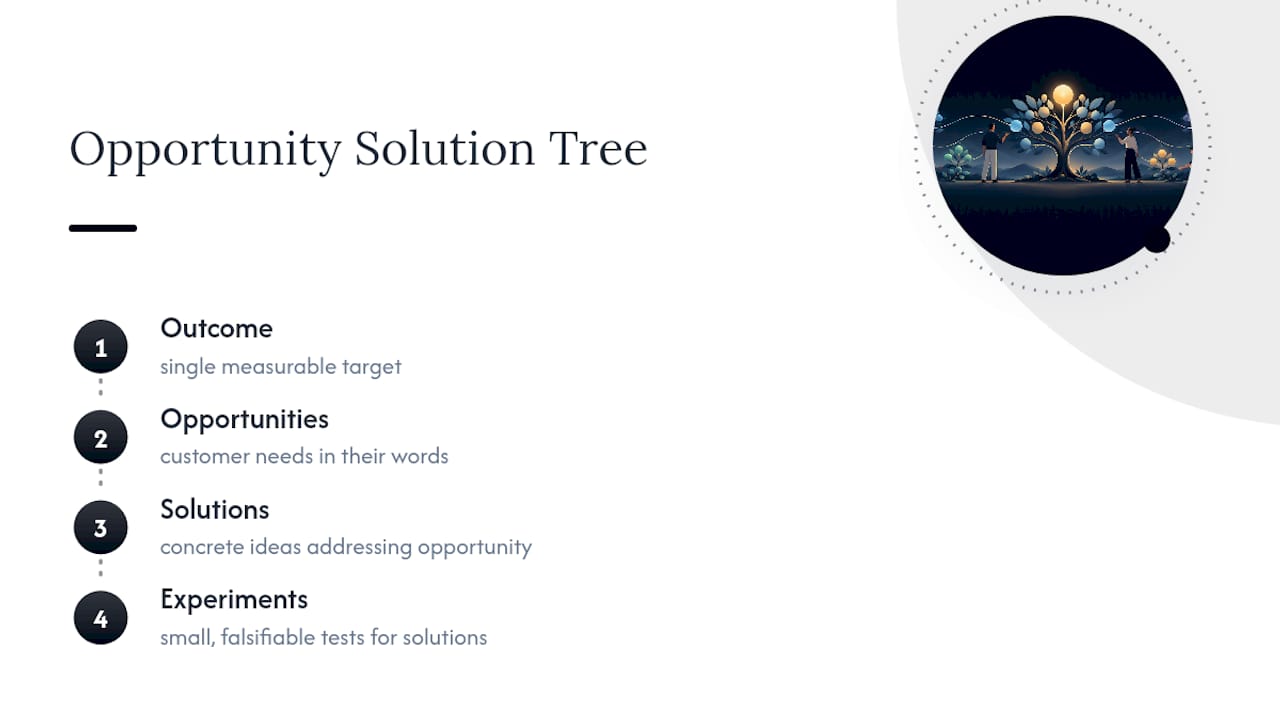
An opportunity solution tree (OST) is a visual map that connects one measurable business outcome to the customer opportunities behind it, the candidate solutions that might address those opportunities, and the small experiments that test whether a solution actually works. You need one the moment you're accountable for an outcome rather than a feature list. It's built for product trios running continuous discovery who need a shared, auditable way to decide what to build next.
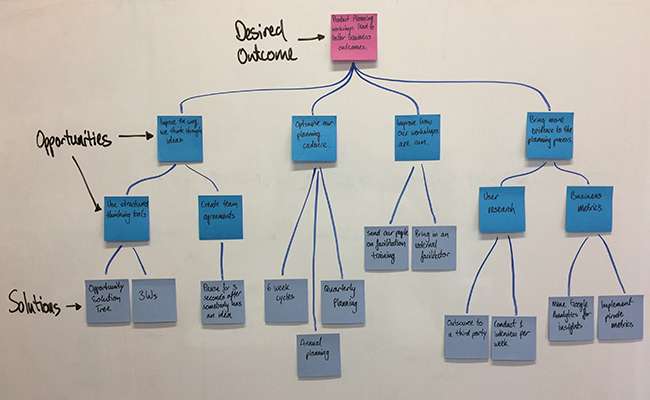
What Does an Opportunity Solution Tree Look Like?
Picture a tree lying on its side, growing from left to right. The trunk is your outcome, a single measurable target like reducing checkout abandonment by a set percentage. Everything else on the tree exists to serve that one number.
Branch off the trunk and you hit opportunities. These are unmet customer needs, pain points, or desires expressed in the customer's own language, not yours. "Shoppers abandon checkout when shipping costs surprise them at the last step" is an opportunity. "Add upfront shipping calculator" is not. That's a solution wearing an opportunity's clothes, and it's the single most common error teams make when they first try this framework.
Beneath each opportunity sit solutions, the concrete ideas your team generates to address that specific customer friction. And beneath each solution sit experiments, the small, falsifiable tests designed to check whether the solution actually delivers before you invest real engineering time in it.
Teresa Torres, who introduced the opportunity solution tree as a continuous discovery artifact, frames it as a way to keep an entire team aligned on how today's interview or experiment connects back to the outcome leadership actually cares about. That's the structural genius of the tree: read it top down and you get prioritization logic; read it bottom up and you get an evidence trail for every decision you made. A four-level framework like this only works when each solution node traces back to something a real customer said or did, not to a hunch in a planning meeting.
Why Build an OST, and When Should You Skip It?
The core benefit is alignment without a meeting. When your outcome sits at the top of the tree, every designer, engineer, and stakeholder can trace any solution back to the customer opportunity it serves and the target it's meant to move. That traceability turns "why are we building this?" from a political question into a visible line on a board.
It also compresses learning cycles. Instead of shipping a big feature and waiting a quarter to see if it worked, teams running an OST test assumptions in days, then update the tree with what they found. The tree becomes a living record of what you tried, what you learned, and why you moved on.
An OST earns its place when:
- You own a measurable outcome, not just a backlog of requests.
- You have (or can get) direct access to customers through interviews, support tickets, or usage data.
- Your team needs a shared artifact to resolve prioritization debates without a senior voice simply overruling everyone else.
Skip it when none of those conditions hold. If nobody on your team has a mandate to own an outcome, or if "customer input" means a single stakeholder's opinion, the tree becomes decoration. It looks rigorous. It isn't. Building one without real customer evidence just dresses up guesswork in a nicer font.
Who Should Build the Tree, and What Do You Need First?
The tree belongs to the product trio: a product manager, a designer, and an engineer, working together with shared decision authority. This isn't a PM solo project handed to design for "polish" later. The engineer's presence matters specifically because feasibility questions get answered in the room, not three weeks later when the solution reaches a sprint planning meeting.
Before you draw a single branch, you need a few things in place:
- A clear, measurable outcome with an actual number attached, not a vague aspiration like "improve engagement."
- Customer evidence, ideally from ongoing interviews, though support logs, session recordings, or sales call notes work as a starting point.
- Basic analytics to confirm the outcome you picked is worth moving and to spot where users are actually dropping off.
- A recurring discovery slot on the calendar. Weekly is the practical minimum; without a standing cadence, the tree stalls after the first workshop.
Tooling matters less than people assume. A whiteboard, a Miro board, or a dedicated app like Raw's user research process to structure interview capture will all work. What breaks teams isn't the software. It's skipping the weekly rhythm that keeps the tree honest.
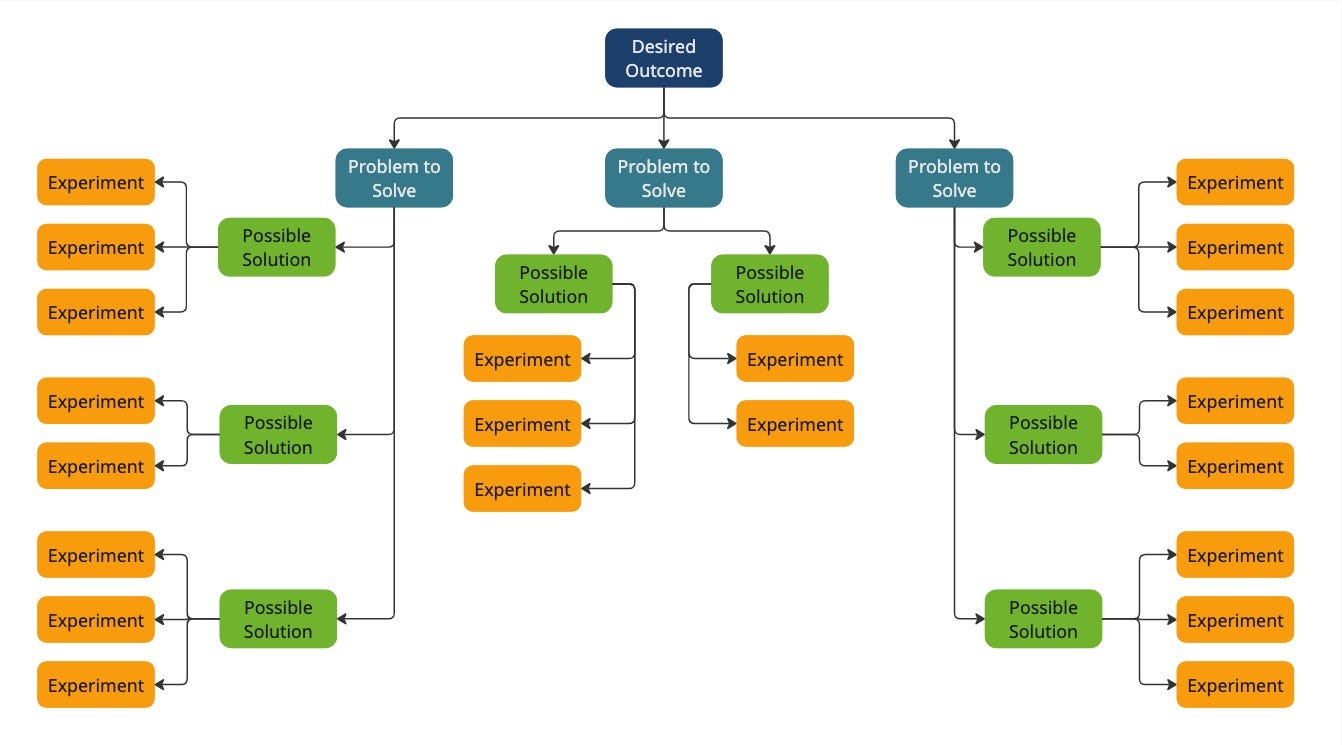
How to Create an Opportunity Solution Tree Step by Step
Building your first tree takes a single working session if you already have some customer evidence on hand. Here's the sequence practitioners converge on:
- Choose one measurable outcome and name the target. Write it at the top: "Increase 30 day retention from 22% to 30% by end of Q2." Vague outcomes produce vague trees.
- Gather customer stories and pull out candidate opportunities. Go back through recent interview transcripts, support tickets, or churn surveys and extract the actual friction points customers describe, in their words.
- Map and cluster the opportunities. Group similar frictions together and keep your top level to somewhere between three and seven branches. More than that and the tree stops being a decision tool and turns into a wall of sticky notes nobody scans twice.
- Pick a target opportunity and brainstorm at least three solutions. Resist the urge to fall in love with the first idea. Three genuinely different approaches force the team to compare trade-offs instead of rubber-stamping the obvious one.
- Convert each solution into an explicit assumption and design a small test. State the riskiest belief the solution depends on, then build the smallest possible experiment to check it, a clickable prototype, a single landing page, a concierge test where a human manually delivers the "feature."
- Run the test, log the result, and update the tree. Mark the branch as validated, weakened, or dead. Prune what fails. Move on to the next solution or opportunity.
Pro Tip: Timestamp every node when you touch it. A tree with no "last updated" field quietly becomes fiction within a month, because nobody remembers which branches reflect this quarter's evidence and which are leftovers from a workshop two quarters ago.
The pm-skills build guide backs this same sequence and reinforces the branch limits: three to seven opportunities at the top level, at least three solutions per opportunity, updated weekly against fresh discovery evidence. Those numbers aren't arbitrary. They're the point at which a tree stops fitting in your head and starts requiring a spreadsheet just to track state, which defeats the purpose of a visual tool in the first place.
How Do You Prioritize Which Opportunity to Pursue?
Not every branch deserves equal attention, and the fastest way to stall an OST is trying to chase all of them at once. Two scoring approaches cover most situations.
The Opportunity Score method multiplies importance by unmet need: score each opportunity on how important customers say it is and how satisfied they currently are with existing solutions, then calculate importance times (1 minus satisfaction). High importance paired with low satisfaction produces the highest score, and that's where the biggest gap between what customers want and what they're getting actually lives.
For teams without survey infrastructure to run that math, a lighter qualitative version works: rate each opportunity on impact, confidence, and effort, then favor high impact, high confidence, low effort combinations first.
A few practical heuristics worth stealing:
- Focus active exploration on your top two or three opportunities at any given time. Anything past that dilutes attention across too many fronts.
- Prefer experiments that can run in parallel rather than in sequence. Testing three assumptions across two opportunities in the same week beats testing one assumption per week for three weeks straight.
- Revisit scores every few cycles. An opportunity that scored low last month can jump the queue once new evidence changes the satisfaction number.
Recommended practice keeps top-level branches at three to seven with at least three solutions per opportunity, a constraint that doubles as a prioritization forcing function. If your tree can't fit that shape, you haven't clustered your opportunities carefully enough yet.
How Do You Design Experiments That Actually Test a Solution?
Every solution rests on assumptions, and most of those assumptions fall into four buckets: will customers want this (value), can they figure out how to use it (usability), can your team build it (feasibility), and does it make business sense at scale (viability). Naming which bucket you're worried about tells you what kind of test to run.
- Identify the riskiest assumption first. Don't test what you're already confident about. If you're sure customers want it but unsure you can build it profitably, test feasibility, not value.
- Build the smallest artifact that exposes the truth. A clickable Figma prototype answers usability questions in days. A single landing page with a fake "buy" button tests value before a line of code gets written. A concierge test, where your team manually performs the service by hand for five customers, tests viability without months of engineering.
- Run several small tests per week rather than one large test per month. Speed compounds. A team running two or three lightweight tests weekly learns faster than one running a single elaborate test quarterly, even when each individual test is smaller in scope.
- Link every result directly to its tree node. Don't file test results in a separate deck. Attach them to the solution branch they tested, so anyone reading the tree six weeks from now sees the evidence, not just the conclusion.
Pro Tip: When a test falsifies a solution, don't delete the branch. Gray it out and leave a one-line note on why it failed. That "graveyard" of dead solutions saves the next person from re-testing an idea you already ruled out.
When a test succeeds, the solution moves toward implementation. When it fails, prune it and return to the opportunity's remaining candidates, or reopen brainstorming if all three have been exhausted.
How Often Should You Update Your Tree?
The tree lives or dies on cadence. Teams that treat the OST as a one-time workshop artifact watch it calcify into something nobody trusts within a few weeks. Teams that build it into a weekly trio meeting keep it accurate, because they update it right after the evidence comes in rather than reconstructing memory later.
That weekly session should do three things: fold in new interview snippets under the opportunities they support, record the outcome of any experiment that finished that week, and prune branches the evidence has quietly killed. A branch you haven't touched or tested in a month is worth questioning, not just leaving in place out of habit.

Evidence discipline matters as much as frequency. Link each opportunity to the actual interview quote or support ticket that surfaced it. Link each solution's test to the experiment log that produced the result. This traceability is what separates an OST from a mind map. As Product Talk's own framing makes clear, the tree is the artifact, but the interview and experiment rhythm underneath it is what actually generates the learning. Skip the rhythm and you're left holding a static picture of a decision you made once and never revisited.
Why Do Opportunity Solution Trees Fail, and How Do You Fix It?
Most broken trees fail for the same handful of reasons, and each one has a straightforward fix.
- Solutions disguised as opportunities. If a branch reads like a feature ("add a progress bar") instead of a customer friction ("users don't know how much setup is left"), reword it back into the pain it's solving before it poisons everything built beneath it.
- Tree bloat. Once you're past a dozen top-level branches, nobody can hold the whole picture in their head anymore. Re-cluster ruthlessly and archive anything that hasn't produced a test in months.
- Going stale. A tree that stops getting weekly updates isn't wrong, it's just fiction with good production values. Restart the trio cadence before adding a single new branch.
- Missing collaborators. If only the PM ever opens the board, the tree stops functioning as shared alignment. Bring the designer and engineer back into the weekly review, not just the initial workshop.
Pro Tip: Practitioners widely note that a large share of a team's first-draft "opportunities" turn out to be solutions in disguise. Read every top-level branch out loud and ask, "Is this something a customer said, or something we want to build?" If it's the second one, it belongs one layer down.
What Does a Working Tree Look Like in Practice?
Take an outcome like "reduce support tickets related to billing confusion by 25%." Interviews surface an opportunity: customers don't understand why their invoice total changed month to month. Under that opportunity, the team brainstorms three solutions: a plain-language invoice breakdown, a proactive email before renewal, and an in-app cost calculator. Each gets an assumption ("customers will read a breakdown email before contacting support") and a small test, a one-week email pilot to a subset of accounts.
Useful template fields for any tree card include:
- Owner (who's accountable for this node)
- Hypothesis (the specific assumption being tested)
- Metric and success threshold (what number, and what counts as a win)
- Evidence links (interview quotes, analytics, experiment logs)
- Last updated (date and who touched it)
For visualization, color code by state (untested, in progress, validated, killed), cap visible depth at experiments so the board doesn't sprawl, and keep each card to a single sentence readable at a glance.
How Raw Applies Opportunity Solution Tree Thinking
Raw builds OST logic directly into its design sprint and Rapid MVP engagements: short-form workshops that turn scattered customer signals into clustered opportunities and three to five candidate solutions per priority, then run a handful of micro-experiments before the sprint even ends. Deliverables map cleanly to tree nodes: research summaries against opportunities, experiment plans against solutions, working prototypes against validated ideas. Clients leave a short engagement with a backlog teams can defend in a planning meeting, not just a list of ideas someone liked.
What I'd Tell a Team Building Their First Tree
Start absurdly small. One outcome, one round of interviews, three solutions for a single opportunity. Teams that try to map their entire product surface in week one produce trees nobody can maintain, and an unmaintained tree is worse than no tree at all because it creates false confidence.
Treat the tree as a hypothesis map, not a spec. Its job is to hold your current best guesses up to evidence, not to document a decision you've already made. Only expand the practice, more trios, more outcomes, once you've proven you can actually sustain a weekly cadence without it collapsing. Discipline before scale, every time.
Ready to Turn Discovery Into a Working Backlog?
Building the tree is the easy part. Running the weekly interviews, designing tests that don't waste engineering time, and translating validated solutions into a real prototype is where most internal teams stall out without dedicated support. Raw runs Design Workshops that convert scattered customer signals into clustered opportunities in days rather than months, backed by User Research that keeps evidence tied to every branch and Rapid MVP work that turns a validated solution into a testable prototype fast.

A short engagement typically produces an opportunity map, a prioritized experiment plan, and at least one working prototype that can be put in front of real customers, the exact deliverables an OST is meant to demand. If you'd rather start with a lighter gut check on where your product currently stands, the Full UX/CRO Audit starts at $2,500 one off. For teams ready to bring in ongoing discovery support, the Design Team (Platinum) plan runs $8,400 per month. Check current services and pricing and book a conversation about which engagement fits where your tree stands today.