




Shortlist Shopify if integrated point of sale and a straightforward launch matter. Shortlist BigCommerce if its catalogue, integrations or wholesale workflows fit how you sell. Both can support complex stores, so test your most demanding products, trade accounts, payments and fulfilment before choosing. Compare the full cost in Australian dollars at today's sales volume and at your next growth milestone.
Shopify vs BigCommerce at a glance
Sources for each line appear in the sections below.
What each platform costs in Australia
The sticker price is the easiest thing to compare and the easiest to misread, so start here.
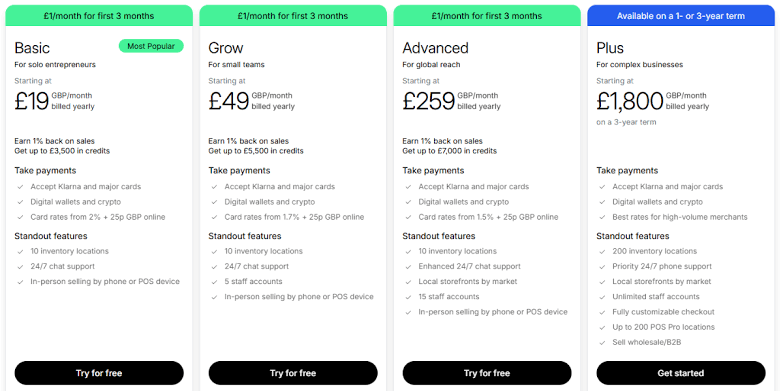
Shopify plans
Shopify's Australian pricing lists Basic at A$56 per month, Grow at A$149 and Advanced at A$575 on monthly billing. The equivalent monthly rates with annual billing are A$42, A$114 and A$431. Plus starts at A$3,700 per month; confirm the contract term for the proposed rate.
Check the tax treatment on your actual subscription invoice and confirm your billing details. The tax a platform charges you on its subscription is separate from how your store collects GST on customer orders.
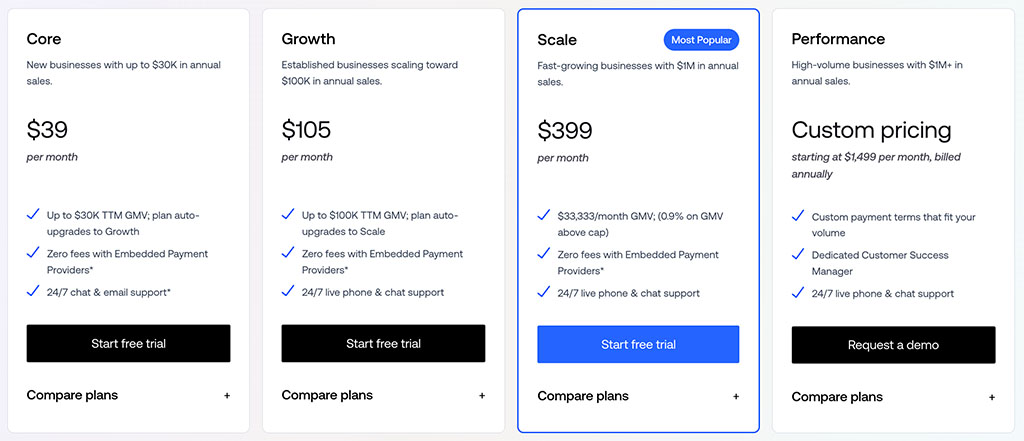
BigCommerce plans
BigCommerce's Australian pricing page lists plans in US dollars before tax. Its eligible gross merchandise value (GMV) rules affect the plan you pay for:
- Core: US$39 per month, or US$29 per month equivalent on annual billing, up to US$30,000 trailing 12-month GMV.
- Growth: US$105 per month, or US$79 per month equivalent on annual billing, up to US$100,000 trailing 12-month GMV.
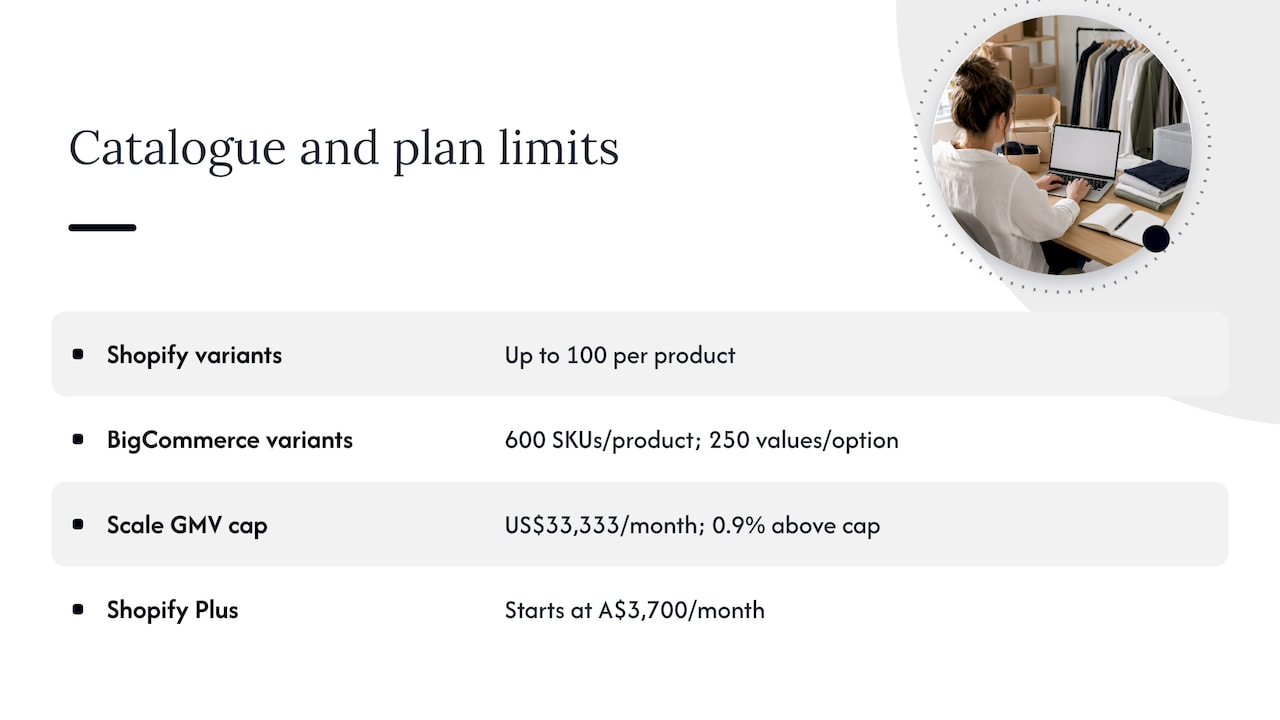
- Scale: US$399 per month, or US$299 per month equivalent on annual billing. BigCommerce lists a US$33,333 monthly GMV threshold and a 0.9% charge on GMV above it; check the tier transition and calculation rules in your quote.
- Performance: from US$1,499 per month on annual billing; confirm the contract and inclusions.
Convert the US-dollar charges to AUD and account for tax and exchange costs. Core and Growth can automatically upgrade when their thresholds are crossed. Confirm how BigCommerce counts eligible orders and GMV rather than substituting accounting revenue in your forecast.
What the comparison looks like for a real store
Model both stores at the same current and projected order volume. Include platform subscriptions, gateway rates, platform payment fees, apps and integrations, theme work, support and migration. Factor in BigCommerce's GMV rules separately from its payment provider fees. The cheaper entry plan may not be cheaper after those costs.
Payments and transaction fees
This is where the real monthly cost often hides.
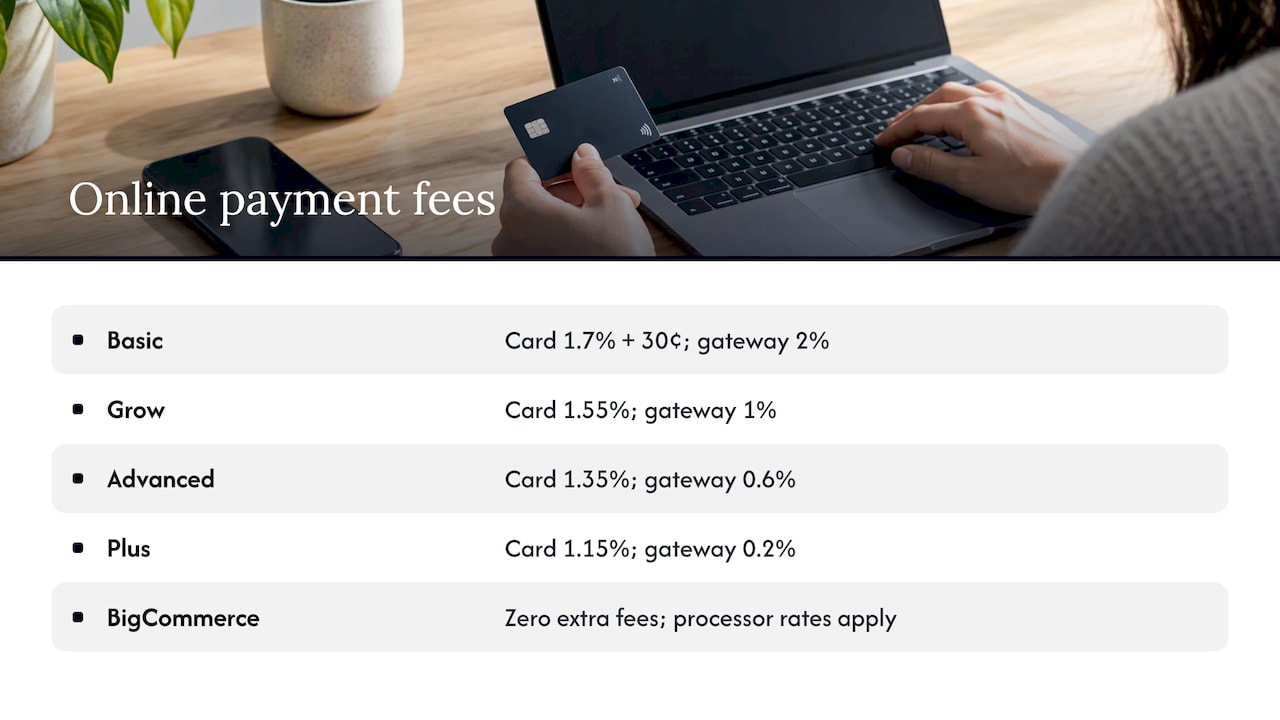
For Australian Shopify Payments, published standard online card rates start at 1.7% plus A$0.30 on Basic, 1.55% on Grow, 1.35% on Advanced and 1.15% on Plus, with the same fixed amount. Other card types and channels have different rates. Where Shopify's third-party transaction fee applies, the listed rates are 2%, 1%, 0.6% and 0.2% respectively, in addition to the processor's charges.
BigCommerce charges no extra platform order fee on orders through its listed Embedded Payment Providers. For Open Payment Providers, its listed fees are 2% on Core, 1% on Growth and 0.6% on Scale on eligible order GMV. Performance terms are contractual. Processor fees still apply, so check both fee schedules and the classification of the exact provider and integration you intend to use.
Test the payments you need, such as Afterpay, with the exact Australian account, gateway and checkout setup. Also test refunds, settlement, GST invoices and shipping: check live rates, labels, rural postcodes and returns for your carrier and fulfilment app. Availability and coverage can vary by plan and integration.
Run a cost test using your payment mix. Include domestic and international cards, alternative methods, average order value and refunds. A platform fee waiver does not mean free processing, and your preferred gateway may change the comparison.
Ease of use and setup
Shopify is a useful starting point for a small team that wants to evaluate a standard online store and integrated POS. BigCommerce is worth testing when the team has specific catalogue, integrations or wholesale needs. Try the same tasks in both: import products, change a template, process an order and issue a refund.
Ask who will own routine changes and who can fix integration failures. Compare partner availability and cost for your particular stack rather than relying on marketplace size or reviewer averages.
Have the person who will run the store perform those tasks. Include the time and help they need in your launch estimate.
Features, apps and what you really pay for
Both platforms mix native features and extensions. Build a list of what your store needs on day one and note what is included, what needs an app, and what requires development.
Price the actual apps or services you need for subscriptions, loyalty, reporting and wholesale. Check whether they support your product and checkout configuration, how fees scale and how you can export the data if you switch.
Check BigCommerce entitlements for price lists, customer groups and quoting with the B2B team. Do the same for ERP connections on both platforms: verify connector availability, setup fees, data ownership and how orders and stock sync.
Point of sale
If you also sell in a shop, Shopify POS syncs inventory, payments and customer data natively with the online store. BigCommerce connects to third-party POS systems such as Square, Clover and Heartland Retail, as its own pricing page lists. Both work. Shopify's is simply one system rather than two.
SEO and discoverability
Test editable metadata, canonicals, redirects, structured data and product discovery on the theme you plan to launch. During a migration, map existing URLs and verify that important products and categories remain accessible and indexable.
Catalogue size, growth and B2B
Shopify documents up to 2,048 variants and three options per product. Some themes, apps and channels still have limitations above 100 variants. BigCommerce lists up to 600 variant SKUs per product and 250 values per option. Its comparison still cites Shopify's older limit, so use each platform's own documentation for its capabilities. Test your largest product through search, checkout, feeds and stock sync.
Shopify B2B is available on Basic, Grow, Advanced and Plus. Non-Plus plans allow up to three active catalogue assignments across B2B markets; direct company catalogues and some advanced payment features require Plus. On BigCommerce, confirm which functions come with the quoted plan and which need B2B Edition or another integration. Test trade prices, quotes, approvals, terms and repeat orders end to end.
Model your busiest month and next year's sales, including promotion peaks. Platform tier thresholds and catalogue or integration limits are separate constraints.
For enterprise quotes, compare service coverage, support response commitments and what is included for B2B, multiple stores or checkout changes. Confirm these on the proposal rather than relying on a starting price.
Themes and design flexibility
This is where we spend most of our time, because the theme is where a store either feels like a brand or feels like a template.
Shortlist themes against your mobile catalogue and checkout journey. Compare purchase price, accessibility, performance, variant handling and the cost of customising and maintaining the theme.
What matters more than theme count:
- Editor experience. Ask the store team to update a product template and a promotion in each editor.
- Customisation depth. Both let a developer rebuild templates fully, or go headless.
- Conversion patterns. A theme gives you a layout. It does not know your customers, your price points or where they hesitate.
That last point is why a theme alone rarely lifts conversion. We have broken down how Shopify's own homepage uses four elements to turn visitors into customers, and the lessons apply on either platform.
Which should you choose?
Use these situations as a shortcut.
- Launching direct to consumer: Start with a Shopify trial if the catalogue, fulfilment and payment setup are straightforward. Use the same launch checklist to compare BigCommerce.
- Selling wholesale: Pilot a trade account on both platforms. Compare catalogue assignments, company pricing, quoting, approval and payment terms in the proposed plans.
- Managing a complex catalogue: Import the hardest product and check variants, channel feeds, search and stock sync. Total SKUs across the store and variants on one product are different limits.
- You have a physical shop too: Shopify, for native POS.
- Managing app spend: Compare the actual subscriptions and connectors required on each platform rather than assuming one will need fewer apps.
- You are replatforming a mid-sized store: Either can work. Let the catalogue, integrations and your team decide, not the headline price.
Scope the migration using a representative product, customer account and order. Include data mapping, redirects, app replacement, payment checks, stock reconciliation and a rollback plan.
Our perspective
We build on both platforms, and our honest view is that the platform is rarely the thing that makes or breaks an online store. Teams spend weeks comparing plan tiers, then launch with a stock theme and a checkout nobody has tested. The store underperforms, and the platform gets the blame.
What we have seen work is the reverse order. Start with research: who is buying, where do they drop off, what do they need to feel confident? Then choose the platform that supports that experience at the lowest friction. For many founders that is Shopify. For catalogue-heavy or B2B businesses it is often BigCommerce.
That is why we pair platform decisions with research, a design sprint or a UX and CRO audit. Test the parts of the buying journey where customers hesitate, then use the findings to choose what to build and measure.
Work with Raw Studio on your store
If you have narrowed it down to one platform, or are still torn between the two, we can help you decide and then design and build it. Our web development and conversion rate optimisation teams work from research and testing rather than guesswork.
Raw Studio's Full UX/CRO Audit starts from $3,500 plus GST as a one-off, and the UX/UI Design Team starts from $8,400 per month plus GST. See the Everdure ecommerce case study, start with a free UX audit, or read our Australian website design cost guide.