.svg)
.svg)



Vercel is a natural candidate for a Next.js project, while Netlify is worth evaluating for its framework support and deployment workflow. Both support multiple frameworks and Git-based delivery. Choose by the exact features you use, operational requirements and expected bill; headcount or traffic alone does not identify the cheaper or faster host.
We design and build websites and products at Raw Studio in Sydney, so we sit on the other side of this decision. We're not a hosting company. We're the team that ships the thing you host, and we've seen how this choice shapes speed, cost and developer happiness. Here is how we'd think about it.
What each platform actually is
Vercel and Netlify solve the same problem. You push code to Git, they build it, put it on a global CDN, and give you preview URLs for every branch. Vercel's own comparison describes both as platforms that simplify deployment through automated CI/CD, CDNs, serverless functions and zero-configuration setups. That overlap is why the choice feels so hard.
The differences sit underneath:
- Vercel is the company behind Next.js. It leans into that: the platform is tuned for server-side rendering, incremental regeneration and React-heavy applications.
- Netlify combines Git-based builds, deploy previews, CDN delivery and serverless capabilities. Check its current framework adapters and operational limits rather than treating maturity as a guarantee of reliability.
One quick answer to a question people ask: no, Netlify does not use Vercel. They are independent competitors, and most teams commit to one for their whole front end.
Framework fit: the question that usually decides it
Start with the features your application actually uses: rendering mode, caching, image processing, middleware, background work and integrations. This is an editorial comparison, not a hands-on benchmark of both hosts.
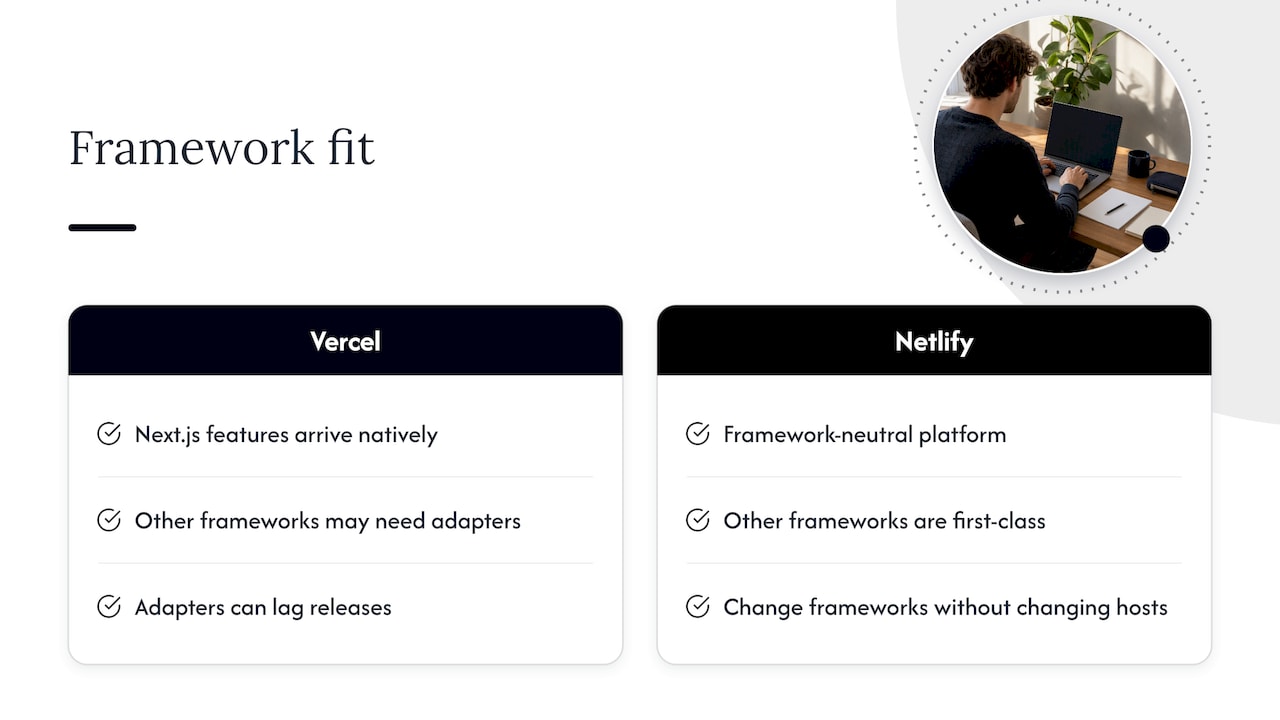
If you use Next.js, Vercel is a sensible starting point because of its close integration with the framework. Netlify also supports Next.js through its OpenNext-based adapter. Check the specific framework version, features and documented limitations instead of assuming every feature behaves identically.
If you use Astro, SvelteKit, Remix, Nuxt or a static generator, evaluate both platforms. Vercel supports many frameworks; Netlify also provides framework integrations. Test your adapter, rendering and runtime requirements rather than assuming one provider always lags outside Next.js.
If the framework is undecided, list runtime, database and portability needs first. Both hosts support multiple stacks, but platform-specific functions, caching and image services can increase migration work.
Netlify also keeps its own guidance on moving between the two, including a Vercel to Netlify migration checklist with specific notes for Next.js apps. It's a useful reminder that switching is possible, just not free of effort.
Pricing: seats versus credits
This is where most comparison articles go stale, because both companies have changed their plans. Check the live pricing pages before you commit. What we can say as of this writing:
Use the live Vercel pricing page and Netlify pricing page as the starting point. Both charge for resources beyond included allowances. Confirm currency, tax, billing period, seat roles, optional features and your account's current or legacy plan before treating a displayed starting price as your total.
Older per-seat Netlify comparisons may describe legacy plans. Current Pro pricing is credit-based with unlimited members, but tiers, allowances and recharge settings still matter. Record the plan version used in your estimate.
What that means in practice
- A small team with modest traffic: estimate seats plus builds, delivery, requests, compute and add-ons. A headcount-only Vercel estimate omits usage.
- A larger team: compare which roles need paid seats and Netlify's included membership against actual credit consumption. Unlimited members does not mean unlimited resources.
- A high-traffic product: model caching, bandwidth, request volume, dynamic compute and traffic spikes on both platforms. Few developers do not automatically make Vercel cheaper.
Calculate costs from current resource rates and a representative workload. A single per-GB comparison can omit compute, requests, credit conversion, region and plan terms. Configure billing notifications and any available spending controls, and understand what is paused or charged when an allowance is exhausted.
Performance: what the benchmarks say, and how much to trust them
There is no verified universal speed winner in this comparison. Build duration, runtime latency and availability measure different things. Test the same commit and workload on both hosts:
- Builds: compare cold and cached builds with equivalent resources and dependencies.
- Requests: measure cached and uncached routes, warm and cold execution, and p50 and p95 latency from relevant locations.
- Application performance: inspect user-facing loading metrics alongside server timing and database queries.
- Reliability: distinguish observed incidents from a contractual SLA, its eligibility and exclusions.
Do not compare an edge-runtime number with a regional serverless function as though they were the same workload. Runtime, cache state, dependencies and distance to data can dominate the result.
Hosting is one part of performance. Large images, JavaScript and slow data access can also affect user experience. Our LCP and website speed guide helps identify application-level work; measure the bottleneck before choosing a migration.
Use repeated tests on production-like deployments, with settings and limitations recorded. Preview defaults may differ from the production configuration you intend to buy.
Building for Australian visitors
If your customers are in Sydney, Melbourne or Brisbane, latency to Australia is worth checking, because many default configurations run server code in the United States.
Vercel's region documentation lists Sydney (syd1) as a compute region, alongside a wider network of points of presence. Static assets come from the CDN either way. The place people get caught is dynamic code. If your database sits in Sydney but your functions run in a US region by default, every request crosses the Pacific. Pin your functions to the same region as your data, whichever platform you use.
For either platform, distinguish static CDN delivery, edge execution and regional functions. Check the selected runtime, plan and actual location of your data. A nearby CDN point of presence does not establish where dynamic code runs or where data is stored.
Adoption and reputation
Popularity is not proof of fit. Look for recent documentation, maintained adapters and support for the exact features your team uses. The Stack Overflow technology survey provides broader developer context, but this article does not use survey percentages as market-share estimates or a hosting recommendation.
Review scores and sample sizes change and are not controlled reliability tests. Review incident history, support terms, service commitments and migration requirements against your own risk tolerance.
Two tradeoffs to investigate during a trial:
- Vercel: bills that climb as you add people or traffic, and an experience that feels best only inside the Next.js world.
- Netlify: a credit system that takes some learning, and fewer bleeding-edge Next.js optimizations out of the box.
Side-by-side summary
How to choose in ten minutes
- Name the framework and features. Next.js makes Vercel a natural candidate, but test Netlify support too. For other frameworks, compare both adapters and runtime requirements.
- Model the whole bill. Include paid roles, credit tiers, delivery, requests, compute, builds and add-ons under ordinary and peak usage.
- Find your database region. Put compute next to it.
- Deploy the same branch to both. Compare build time, preview quality and the dashboard. An hour of testing beats a week of reading.
- Set a billing alert on day one. Usage-based models surprise teams that don't watch them.
Our perspective
We'll be honest: the hosting platform is rarely what makes or breaks a digital product. We've seen beautifully hosted sites convert badly, and modest setups perform brilliantly, because the design was clear and the research was sound.
That's the lens we bring. At Raw Studio we work from research and data, then use frameworks such as Design Sprint and Rapid MVP to get a validated product out quickly. In that world, hosting should disappear into the background. It should be quick to set up, cheap to run while you're still learning, and easy to change when the product grows. For an early MVP, that often means picking whichever platform your developers already know and moving on.
We also care about the developer experience for its own sake. A team that enjoys shipping ships more often, and that's why we've written about prioritizing developer-first thinking. Vercel's polish and Netlify's predictability both serve that goal in different ways.
Our advice is simple. Don't let hosting shape your product. Let the product, the framework and the team shape your hosting. If conversion is the goal, spend the energy on the page, the copy and the speed of what you ship.
Philippe
When the host isn't the real problem
A lot of the teams who ask us about Vercel and Netlify are really asking why their site is slow, or why visitors leave before they convert. Moving hosts rarely fixes that.
If you're in that spot, there are two places we'd start:
- Our Full UX/CRO Audit starts from $3,500 plus GST as a one-off. Confirm current scope and pricing before booking.
- Our conversion rate optimisation service works on the pages that matter, with data behind each change.
If you're still validating an idea, our Rapid MVP process is built to get something real in front of users quickly. And if you need a team to build it, we also offer web development.