



Choose Webflow if you want a fast, design-led marketing site that your team can edit visually, with hosting, security and updates handled for you. Choose WordPress if you need a huge plugin ecosystem, full control of the code and server, or a content-heavy site with complex custom functionality. We build on both worlds of thinking every week at Raw Studio, a Sydney agency, so this guide is about how to decide, not about picking a team.
How the two platforms actually work
The cleanest way to see the difference: Webflow is a hosted, visual-first design and CMS platform, where you design on a canvas and publish on Webflow's own infrastructure. WordPress.org is open-source software installed on separately chosen hosting, extended through themes and plugins.
There is a wrinkle that trips up many searchers. WordPress.com is a different thing from WordPress.org: it is a fully hosted platform where hosting, security, backups and updates are managed for you. When people say "WordPress" in a comparison with Webflow, they usually mean self-hosted WordPress.org, and that is what we mean below unless we say otherwise.
Think of Webflow as renting a well-fitted studio: the lights, locks and plumbing are someone else's job. Self-hosted WordPress is buying the building. You get every room and every wall you could want to knock down, and you also get the roof.
Webflow vs WordPress at a glance
Pricing: what you really pay
Price is where most comparisons go wrong, because they compare a subscription with a blank hosting bill.
On Webflow, the official pricing page lists the Basic site plan at US$15 per month and the CMS-capable plan at US$25 per month when billed yearly, in US dollars per site and plus applicable taxes. The Basic plan includes a custom domain, 300 static pages, 10 GB of bandwidth and unlimited form submissions. For Australian budgeting, the Australian Small Business Guide put those two plans at roughly A$22 and A$36 per month once converted, indicative figures that move with the exchange rate.
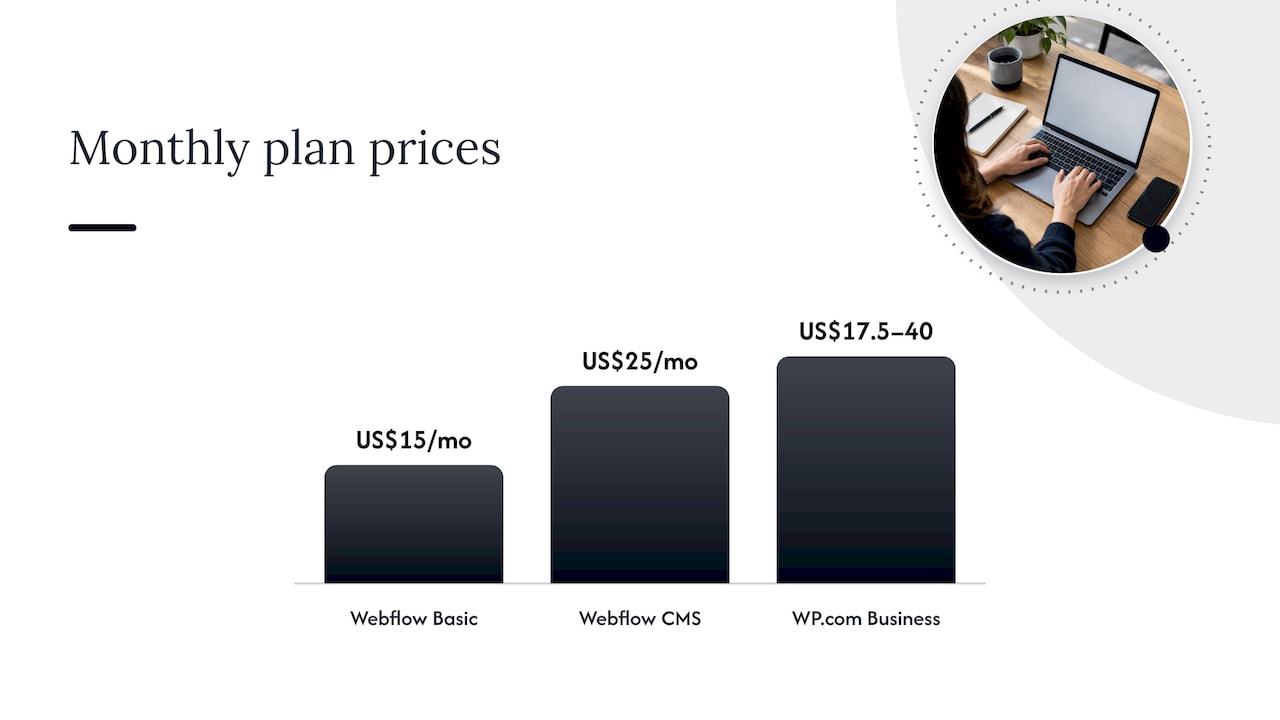
On WordPress, the software is free, but a site is not. You pay for a domain and hosting, usually premium themes or plugins, and someone's time for updates, backups and fixes. If you go the hosted route, WordPress.com lists Business plans in US dollars from US$17.50 up to US$40 depending on the billing term, and its free plan comes with a WordPress.com subdomain, 1 GB of storage and no custom domain or plugin installation.
A fair way to compare:
- Year one build cost. Usually the biggest number, on either platform. For what an Australian build typically costs, see our guide to website design cost in Australia.
- Running cost. Webflow: one plan fee. WordPress: hosting plus plugin licences plus maintenance.
- Change cost. How much does it cost each time you want a new page layout? On Webflow, a trained marketer can often do it. On WordPress it depends on the theme and builder you chose.
WordPress is cheaper at the very start if you accept a template and handle upkeep yourself. Webflow is often cheaper in total attention, because there is less to babysit.
Design control and ease of use
This is where Webflow earns its reputation. Its editor is built on CSS concepts, so designers get granular control over every layout decision without writing code. That is why design-led teams like it: what is in the mockup can be what ships.
The trade is a learning curve. The Webflow Designer asks you to understand box models, classes and layout logic. Once you do, you move quickly. Until you do, it can feel like a pro tool handed to a beginner.
WordPress is the more familiar environment. It extends through themes, blocks, page builders, plugins and code, and the WordPress.com comparison notes that a highly bespoke design can need more configuration or developer involvement. With a page builder such as Elementor, you can get comparable visual control, with the plugin ecosystem behind it.
On scale of choice, WordPress leads: Zapier's comparison counts 13,000+ free themes and 60,000+ plugins, against 6,000+ Webflow templates and roughly 100 apps, with Zapier bridging the gap. If your project hinges on a niche integration, such as a specific booking, membership or learning plugin, check that first. It can decide the whole question.
SEO: Webflow vs WordPress
Both platforms can rank. Neither one ranks a site for you.
Webflow includes controls for page titles, meta descriptions, image alt text, Open Graph settings, canonical URLs, XML sitemaps and CMS-item indexing, documented on its official pricing and features page. Schema markup can be added manually in the page header. Everything is in one interface, which makes it hard to forget a basic.
WordPress gives you control over permalinks and alt text, and leans on plugins for schema, on-page SEO and metadata. That is powerful, and it is also one more layer to configure and keep updated.
What moves rankings in practice is the same on both: fast pages, clean structure, useful content and consistent publishing. If publishing consistency is your bottleneck, Webflow SEO automation tools can help with keyword research, content planning and publishing around a Webflow site. Our own advice: pick the platform your team will actually keep publishing on.
Hosting, security and maintenance
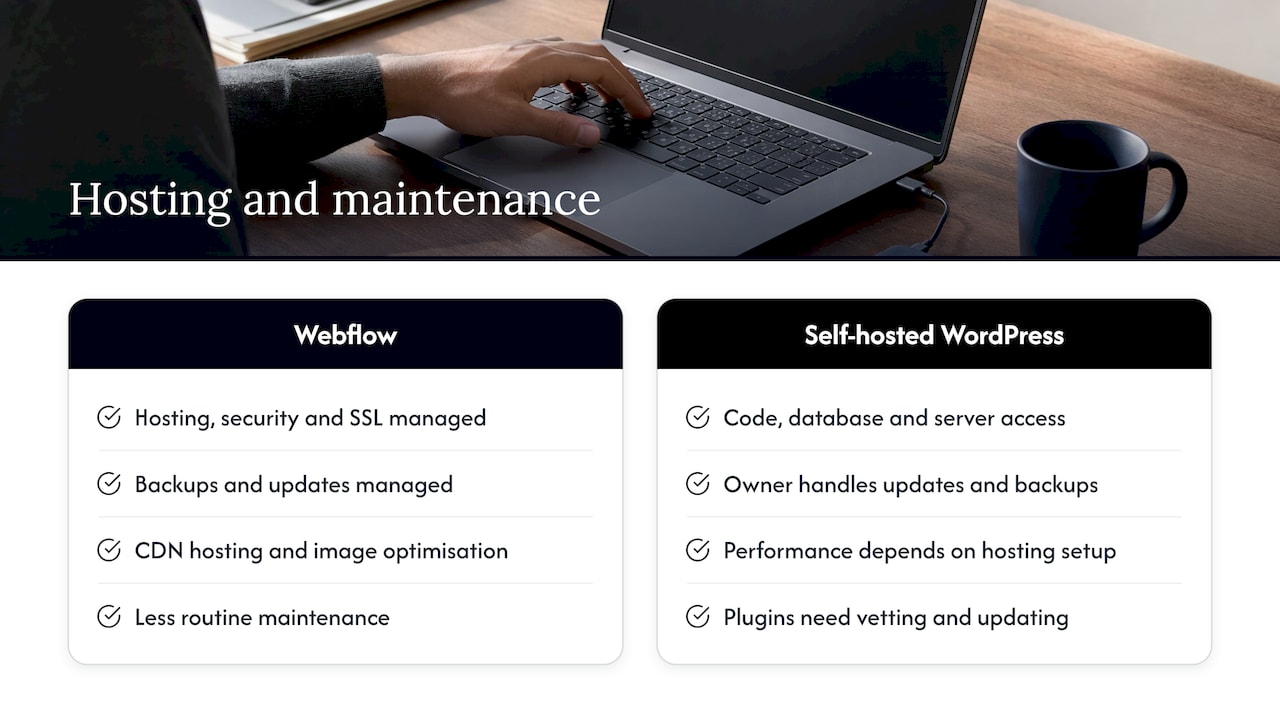
Webflow manages hosting, security, SSL, backups and software updates, and includes CDN-backed hosting and image optimisation, according to WordPress.com's comparison. Self-hosted WordPress gives you access to the code, database and server, but updates and backups are on you, and performance depends on your hosting and setup.
That last point is easy to underestimate. WordPress's own Site Health documentation shows how plugins, themes, server configuration, database, permissions and PHP settings may all need inspection. It is a flexible system, and it needs an operator.
On security, Piperocket Digital cites Patchstack's count of 7,966 disclosed vulnerabilities across the WordPress ecosystem in 2024, 96% of them in plugins and only 7 in core. The lesson is not that WordPress is unsafe. It is that every plugin you add is something to vet and update, and a managed platform removes much of that routine.
If you also care about where a front end is deployed, see our comparison of Vercel and Netlify, which matters when a project goes beyond a hosted builder.
Webflow limitations worth planning for
Good choices come from knowing the edges. Plan around these:
- Not a full development environment. Webflow allows CSS and JavaScript through custom code embeds, but WordPress is code all the way down, and its REST API lets it work as a headless CMS behind any front end.
- Smaller extension catalogue. Fewer apps, so some needs are met through Zapier or custom code.
- Learning curve. The Designer rewards training. Budget for onboarding if your team will edit layouts.
- Platform dependency. Hosting lives with Webflow, so you build within its model.
The practical response is scoping. List your must-have integrations and content types before you commit, and map each to a native feature, an app or a custom embed.
Webflow vs a custom-coded website
A fully custom build, in a framework of your choice, gives you unlimited freedom and the full burden of it: developers for every change, your own hosting and deployment pipeline, and ongoing maintenance. It makes sense when the website is the product, such as a web app with complex logic.
For a marketing site, a custom build is often more than the job needs. Webflow gives a design team most of the visual freedom with far less engineering overhead, and you can still add custom code where it counts. If you are weighing a custom route, our web development service page explains how we approach it.
Which should you choose?
If you're a startup launching or validating a product
Speed and learning matter most. You want a site live in weeks, editable by a founder or marketer, and easy to change after the first customer conversations. Webflow's visual build and bundled hosting fit that. It is a strong default for landing pages, early marketing sites and prototype funnels. If the product itself needs complex logic, build the product separately and keep the marketing site in Webflow.
If you're an established business improving engagement and conversions
Here the question is who changes the site and how often. If your marketing team runs experiments on layouts, calls to action and page structure, Webflow's visual control shortens the loop. If you have a large content library, many contributors, or heavy plugin-based functionality, WordPress may already be the right home, and the better investment is improving the experience on it.
Quick decision guide
- Need design precision and low upkeep? Webflow.
- Need a specific plugin, or a very large blog with many authors? WordPress.
- Need a product with custom logic? Custom code, often paired with a marketing site on Webflow.
- No technical person on staff? Webflow, or managed WordPress.com.
- Already on WordPress and it works? Fix the experience before you migrate.
If you'd like a shortlist of studios that build on Webflow here, we compared them in Top 10 Webflow agencies in Australia.
Our perspective
We get asked "Webflow or WordPress?" more than almost any other question, and the honest answer starts somewhere unexpected: with the people who will live in the site after launch.
A website isn't a one-off deliverable. It's a tool your team picks up on Monday morning. When we run a Design Sprint or a Rapid MVP with a client, the thing we keep seeing is that the best platform is the one that lets the team test an idea, learn from it and change the page without a queue of tickets. That is why we lean on Webflow for so many marketing sites: the design that gets approved is the design that goes live, and the team can keep iterating.
We also think the platform is the smaller decision. What drives results is the research behind the layout, the clarity of the message and the testing afterwards. Our own work is built around that: user research, UX and UI design, and conversion rate optimisation, with data guiding each choice. Some of our clients have seen conversion rates double after a redesign built this way.
So start with the job to be done, pick the tool that makes that job lighter, and treat the launch as the first experiment rather than the finish line.
Work with Raw Studio on your next site
If you are choosing a platform and want a second opinion grounded in your own users and numbers, start with our Full UX/CRO Audit, from $2,500 one-off. It shows where your current site loses people and what to fix first, whichever platform you land on.
If you need ongoing capacity instead, our Design Team (Platinum) plan is $8,400 per month, and we also offer RapidMVP, Design Sprint and web development engagements. Want a quick read first? Try our free UX audit, or see everything on our services page.