



Shortlist Zendesk if your team works through ticket queues, routing rules and service targets across several channels. Shortlist Intercom if support starts inside your product and the Messenger or Fin is central to the experience. Both handle tickets and conversations. Choose by testing the workflow and plan you would actually buy, then model seats, AI usage, channels and add-ons together.
We are a Sydney design agency, not a helpdesk vendor, so we have nothing to sell you on either side. What we do see, project after project, is how the support experience shapes the product experience. This guide covers the differences that matter, what each really costs for an Australian business, and how to decide.
The core difference: tickets versus conversations
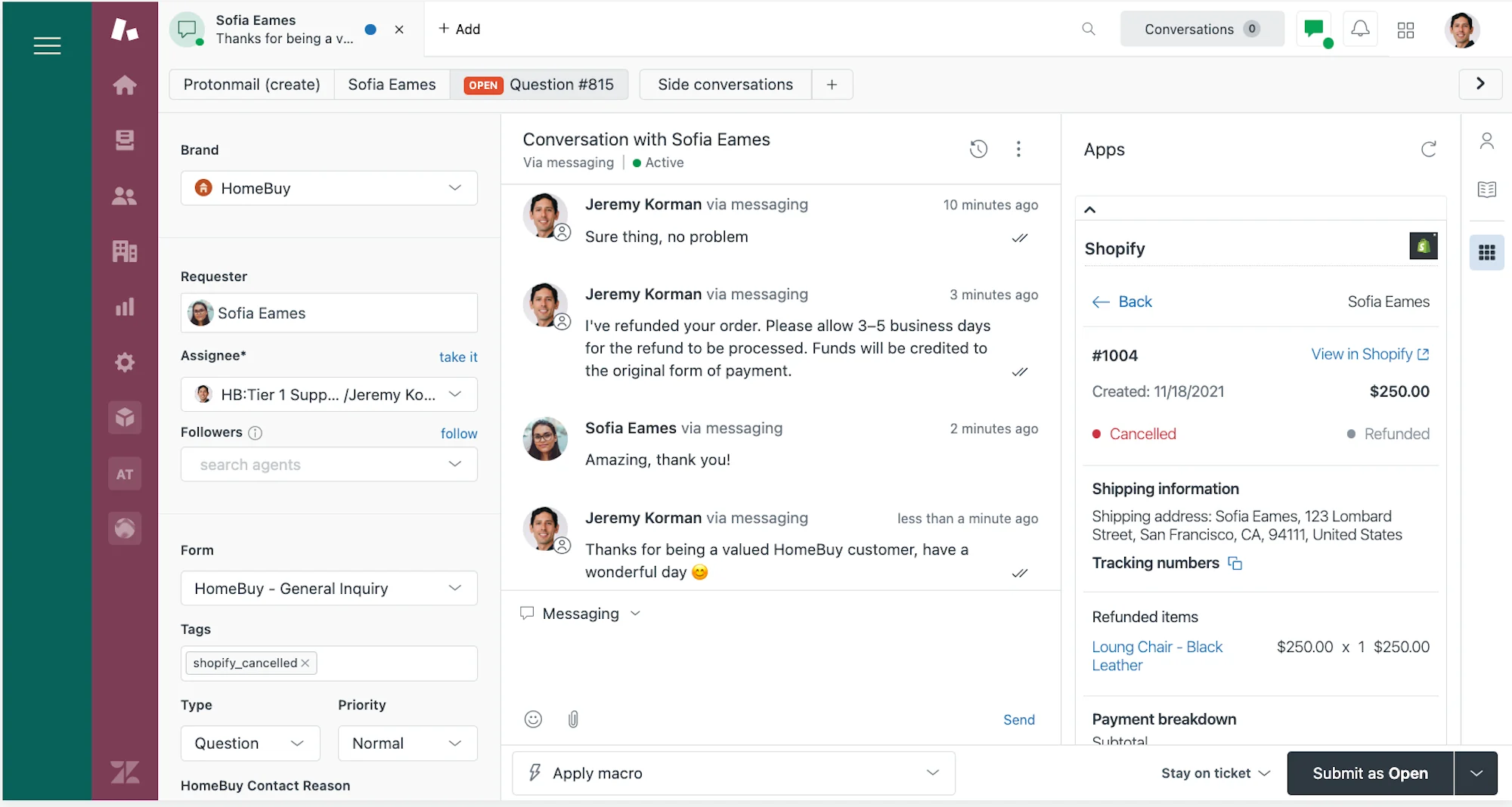
Zendesk centres its support workflow on tickets, queues and rules. Intercom centres its experience on conversations and the customer context around them, and also offers tickets for work that needs a structured handoff. Test how each handles a real escalation from first contact to resolution.
Compare ticket ownership, routing, business hours, service targets and reporting on the proposed plan. For in-product support, try the Messenger, account context, proactive messages and human handoff. An advertised feature is only useful if it handles your actual exception cases.
That sounds abstract until you picture your team. If a support lead wants to see a queue, sort by priority, assign by skill and measure against an SLA, Zendesk feels natural. If your customers are logged into your app and a quick message from a teammate fixes the problem in thirty seconds, Intercom feels natural.
What reviewers say
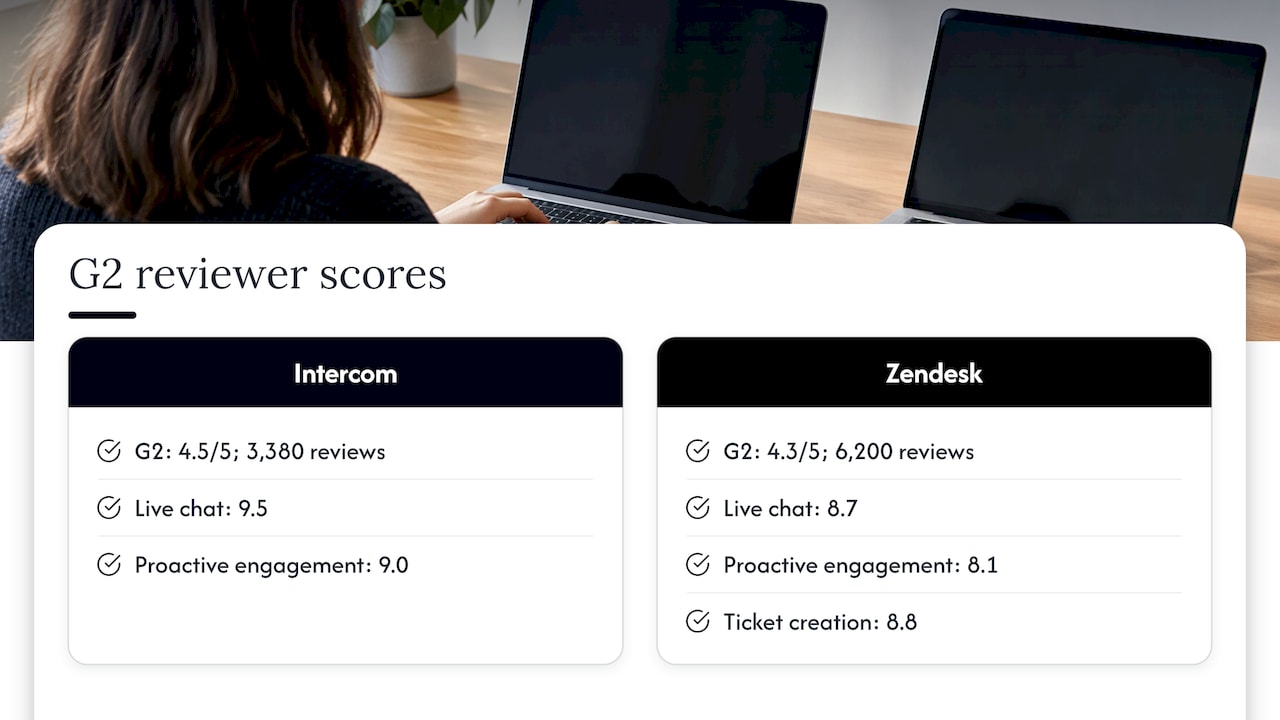
Use reviews to identify questions for a pilot, such as admin effort, reporting flexibility and the experience of agents handling several channels. Ratings from different review samples do not show which product will work better for your team.
Ask two agents and an administrator to run the same set of cases. Compare what they can see, how quickly they can route an issue, and whether the reporting reflects the service targets you use.
Feature comparison at a glance
Check your exact integrations and service targets against the proposed edition. Ask each vendor to demonstrate both customer-facing SLAs and any internal escalation targets you need.
Ticketing, messaging and CRM
Ticketing and workflow
Zendesk Support Team is the entry ticketing plan. Suite plans add broader channel coverage, with routing, reporting and other features varying by tier. Compare a plan with the channels and controls you actually need rather than treating the lowest seat price as the price of the whole suite.
Intercom Advanced adds team inboxes and more workflow and assignment controls. Expert is the tier to check if you need features such as SLAs, SSO or multiple brands. Confirm current inclusions in the plan grid and quote.
Messaging and engagement
Intercom supports customer conversations inside the product. Distinguish standard Messenger and inbox features from advanced outreach features such as product tours, which may require the Proactive Support Plus add-on. Check message and channel charges for the volumes you expect.
Is Intercom a CRM?
Intercom keeps customer context for support and engagement. If your main job is tracking deals, forecasting sales or managing a sales pipeline, evaluate a dedicated CRM rather than assuming a helpdesk will cover it.
Is Intercom now called Fin?
Fin is Intercom's AI agent. You can buy it with the Intercom helpdesk or evaluate it alongside a supported existing helpdesk, including Zendesk. Confirm integration, handoff and minimum usage commitments before treating that option as a direct substitute for a full migration.
AI: where the bills get interesting
Intercom lists Fin at US$0.99 per outcome for its standard offering, with separate voice pricing. An outcome can be a confirmed resolution, an assumed resolution if the customer does not ask for more help, or completion of a configured workflow, which can include a handoff. Intercom says it charges at most once per conversation. When Fin runs on another helpdesk, check the minimum monthly commitment and your existing helpdesk charges.
Do not compare headline resolution rates without a common definition. Run both on the same sample of requests and track verified fixes, repeat contact, handoffs and billable outcomes. A billed outcome is not necessarily the same as a confirmed fix.
Zendesk bills AI agents by automated resolutions, with an included allowance that varies by plan and agent count. Check committed usage, pay-as-you-go rates and the terms for exceeding the allowance. Copilot and other products may add separate charges. Compare the applicable rate in your own quote rather than assuming the same unit as Fin.
What it costs in Australia
The comparison below uses published US-dollar rates. Convert the proposed invoice to AUD, then confirm the actual billing currency, exchange costs and applicable tax before committing.
Compare the Zendesk Australian pricing page and Intercom pricing page on the same billing term. Intercom currently displays an Essential discount for eligible new customers alongside its regular rate; confirm its duration and the renewal price. Exclude temporary offers from long-term estimates.
Work out your own total
Seat price alone misleads. A fair comparison uses this formula for a month:
- Agents multiplied by seat price on the plan that has the features you need (SLAs, skills routing, regional hosting).
- Forecast billable AI outcomes using each vendor's definition. Apply included usage, commitments and overage rules separately.
- Pay-as-you-go channels you will actually use, such as SMS, WhatsApp or phone.
- Add-ons, then GST if it applies.
Calculate a typical month and a busy month. Include setup and maintenance, and check whether choosing another region or adding channels changes the plan you need.
Data hosting for Australian businesses
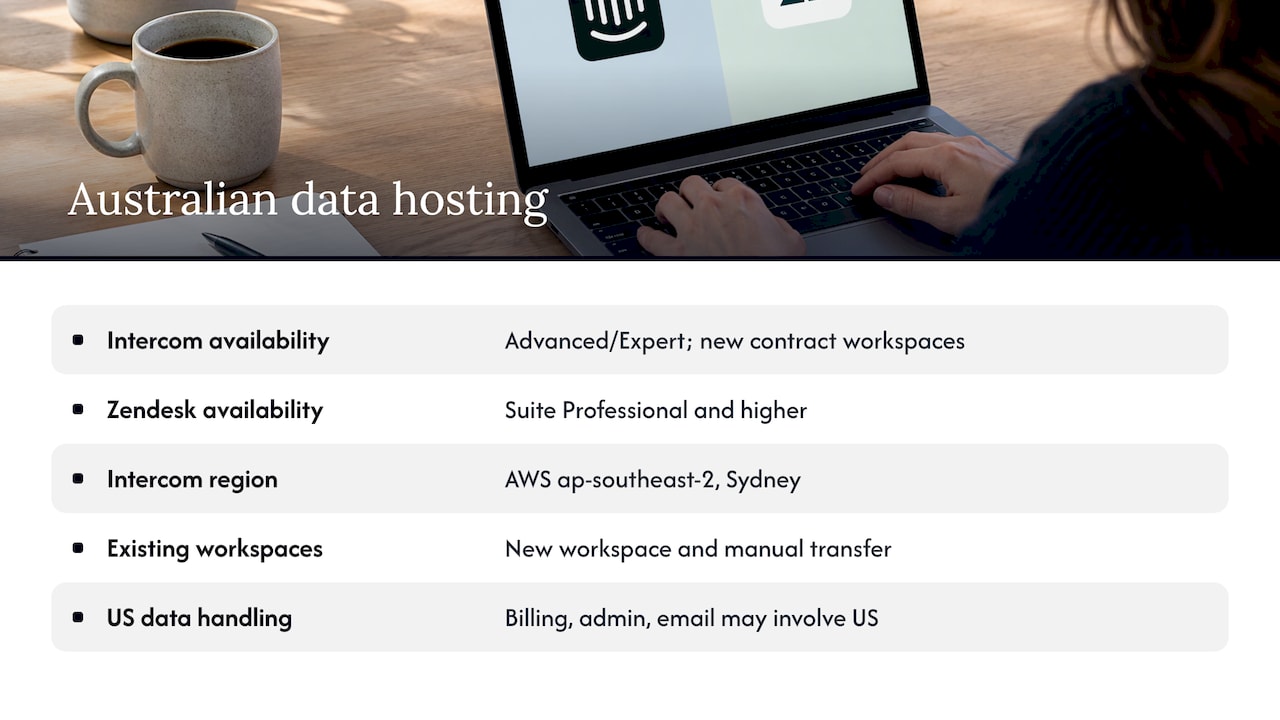
If data location matters to your organisation, ask for a written hosting commitment before choosing a plan. For Zendesk, confirm whether your specific products and AI features can use Australian hosting, whether it is included or separately contracted, and what is excluded. A region option is not proof that every part of the service processes data there.
Intercom documents Sydney hosting for eligible new Advanced and Expert workspaces, with contract and programme restrictions. Some data and services may still be processed outside the region. Switching regions requires creating a new workspace and transferring eligible data and settings; some conversation history can be exported but not migrated. Check the current restrictions and plan the change before launch.
Which one suits which business
Pick Zendesk when:
- You have a dedicated support team and a queue that never really empties.
- You need SLAs, skills-based routing, quality assurance and detailed reporting.
- Customers reach you by email, phone and chat, and you want one view of all of it.
- You rely on a large app ecosystem.
Pick Intercom when:
- Your customers live inside your web app or product.
- Live chat, product tours and proactive messages are part of how you onboard and retain users.
- You want Fin front and centre and are comfortable with outcome-based billing.
- Your team is small and values a polished messenger over deep configuration.
Consider both when you want Intercom's Fin on top of a Zendesk helpdesk you already run.
Our perspective
We have redesigned onboarding flows, dashboards and help experiences for startups and enterprises, and one pattern keeps repeating: the support tool is rarely the problem. The problem is that customers need support because something upstream was confusing.
That changes how we would choose between these two. A conversation-first tool like Intercom is great at catching people in the moment. A ticket-first tool like Zendesk is great at making sure nothing is lost. Neither fixes a confusing checkout, a vague empty state or a help centre nobody can search.
Start with research. Group support requests by the task that prompted them, fix recurring problems in the interface, and measure whether repeat contact falls. Use a baseline rather than assuming a particular reduction.
Pick the platform that matches how your team works. Then design the chat widget, the help centre and the handoff as part of your product, with data behind each decision.
Making the choice stick: design matters as much as software
Once you have picked a platform, three design decisions decide whether it pays off.
Where the widget appears. A messenger that pops up on every page trains people to dismiss it. Trigger it where users actually hesitate, such as pricing and checkout. Our piece on UX mistakes that kill SaaS conversion covers several of those moments.
How the help centre is structured. Confirm your plan includes the help-centre features you need. Organise articles by customer task and test search with real queries.
How AI hands off to humans. An AI agent that cannot pass context to a person creates a worse experience than no agent. Review the handoff screens the way you would review any critical flow. If you are weighing other stack decisions at the same time, our comparisons of Segment and RudderStack and Linear and Jira use the same criteria-first approach.
How Raw can help
We do not resell Intercom or Zendesk. We help you make the experience around them work: researching where customers get stuck, redesigning the flows that generate tickets, and improving conversion on the pages that matter.
Raw Studio's Full UX/CRO Audit starts from $3,500 plus GST as a one-off, and its UX/UI Design Team starts from $8,400 per month plus GST. An audit can help identify where confusing flows create support demand.
Not ready to commit? Start with a free UX audit, or look at how our conversion rate optimisation service works alongside whichever support platform you choose.