



Neither framework wins outright. Choose Tailwind CSS when you want a custom, brand-led interface and a lean production stylesheet. Choose Bootstrap when you need a working, consistent interface quickly and your team would rather copy a documented component than design one. The rest of this guide shows where each one earns its place, with the numbers, the trade-offs and a simple way to decide.
We build websites and products for startups and established companies, so we see this decision from the project side as much as the code side. The question is rarely "which is better?". It is "which one gets this product to the right result with the team we have?"
The core difference: utilities versus components
Tailwind CSS describes itself as a utility-first framework. You get classes such as flex, pt-4, text-center and rotate-90, and you compose them directly in your markup to build any design. There is no pre-made "card" or "button". You make your own.
Bootstrap goes the other way. You write class="btn btn-primary" and get a styled, tested button. Bootstrap is also moving: Bootstrap 6 has been rebuilt as a framework-agnostic design toolkit with new components, an updated visual design, CSS-first theming and more powerful JavaScript plugins.
A useful way to think about it comes from a comparison on CSSmatic: Bootstrap treats your design as a delta from theirs, so you customize by exception. Tailwind treats your design as the source of truth, so you customize by definition. That one idea explains most of the differences below.
Customization and design consistency
With Bootstrap, you change the defaults in one of three ways: Sass variables before import, CSS custom properties at runtime, or overrides with higher specificity. It works well while your design stays close to Bootstrap's look. When it drifts, you start fighting the framework. DesignRevision calls this the "override tax": Bootstrap speeds up the first 80% of a design but can slow the last 20%.
With Tailwind, your configuration declares colors, spacing, breakpoints and fonts, and utilities are generated from them. Tailwind v4 moved that configuration into CSS itself. Customization is added directly to the main CSS file with native CSS syntax, and the @theme directive is where design tokens live. Because those tokens become CSS custom properties, you get runtime theming and design-token consistency without a separate config layer.
The flip side is real. Bootstrap sites can look like Bootstrap, and Tailwind sites can drift into inconsistency if nobody disciplines the tokens, as the CSSmatic comparison points out. A framework does not replace a design system. If you are building one, our guide to the best design system tools is a good companion.
Prebuilt components: where Bootstrap pulls ahead
Bootstrap has an extensive built-in component library. Tailwind CSS has minimal pre-built components and relies on community plugins. Tailwind CSS itself ships no component library, and Tailwind Plus (formerly Tailwind UI) closed to new customers on 9 September 2026.
In practice, Tailwind teams reach for open-source layers on top: shadcn/ui, DaisyUI or Headless UI. Those are good options, but they are extra choices to make and maintain. If your project is a dashboard where nobody will judge the buttons, Bootstrap's ready-made parts are a genuine advantage.
Learning curve and speed of development
Bootstrap has a low learning curve: copy a documented component and adjust it. Tailwind sits at moderate: you learn the utility vocabulary, then build your own component abstractions. According to Hashbyt's 2026 comparison, Bootstrap is quicker for prototypes, while Tailwind's productivity advantage appears after a team establishes reusable abstractions, conventions and shared design patterns.
Tailwind's own documentation makes the case for utilities this way: you skip inventing class names and switching files, changes feel safer because they affect one element, and CSS stops growing linearly.
The markup does get busier. Long class lists are the most common complaint from developers who are new to Tailwind. Teams usually solve it by extracting components in their JavaScript framework rather than in CSS.
Performance: CSS size and load speed
This is where Tailwind's design pays off. It scans your source files and generates only the classes it finds, so CSS size grows with the utilities you actually use. Tailwind also automatically removes unused CSS for production, and its own homepage says most projects ship less than 10 kB of CSS to the client.
Bootstrap ships a full stylesheet. Per Hashbyt, Bootstrap 5.3.8 (released 26 August 2025) comes to 232 KB uncompressed, about 31 KB gzipped. Another 2026 comparison puts a production Tailwind build at roughly 5 to 15 KB gzipped, against 22 KB for Bootstrap 5.3's full CSS, or 12 to 18 KB with selective imports.
A May 2026 benchmark on throttled 4G measured 12.4 kB of gzipped CSS for Tailwind 4.0 against 46.1 kB for Bootstrap 6.0, with a largest contentful paint of 1.41 s against 1.67 s. Treat single benchmarks as indicative, since results depend on the page, the build and the hosting.
CSS weight is only one slice of load time. Images, fonts, third-party scripts and server response usually matter more. If you are chasing a slow page, start with our guide to fixing LCP and website speed before blaming your framework.
Responsive design and breakpoints
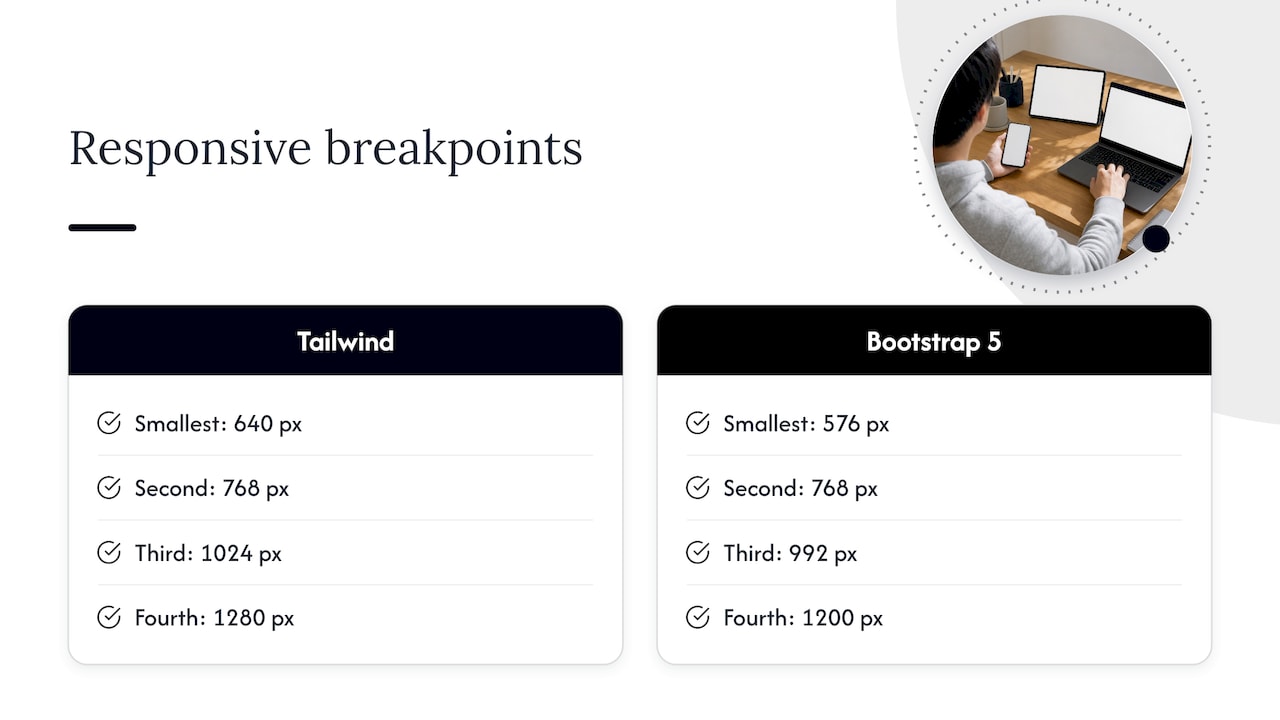
Both frameworks are mobile-first and use min-width media queries. Tailwind's default breakpoints are 640, 768, 1024, 1280 and 1536 px, while Bootstrap 5 uses 576, 768, 992, 1200 and 1400 px. In Tailwind you apply a breakpoint prefix to any utility, so responsive tweaks sit right beside the element they change.
Mobile-first is a sound default, but it is not a complete strategy. We wrote about the pitfalls of mobile-first web design and why balance matters.
Accessibility: a different kind of head start
Bootstrap's interactive components ship with WAI-ARIA roles and attributes for touch, mouse, keyboard and assistive-technology users. Tailwind ships no behavioral components, ARIA patterns, keyboard interaction or focus management. Its documented accessibility utilities are the sr-only and not-sr-only screen reader classes, and the rest is up to you.
Focus styles show the difference. One 2026 analysis notes that Bootstrap's default focus ring meets 3:1 contrast on most backgrounds, while Tailwind relies on browser defaults unless you override them. That does not make Tailwind inaccessible. It means accessibility is a design decision you make deliberately, often by pairing Tailwind with an accessible component layer such as Radix-based shadcn/ui.
Neither framework certifies you as compliant. Whichever you choose, test with a keyboard and a screen reader. Our WCAG 2.2 checklist covers the six items to fix first, and embedding accessibility in your design process keeps the problem from returning. For the wider business case, this overview of web accessibility and SEO impact explains why inclusive builds also help discoverability.
Dark mode is a good test case. Both frameworks can do it, but contrast and focus states still need care, as we cover in designing inclusive dark modes.
Is Bootstrap outdated?
No, but it is no longer the automatic default for new projects. Stackwise's 2026 analysis says Bootstrap's usage is stable with gradual decline, and that version 5.3 and later (with CSS custom properties and a dark mode system) remains useful for admin dashboards, internal tools and rapid prototyping.
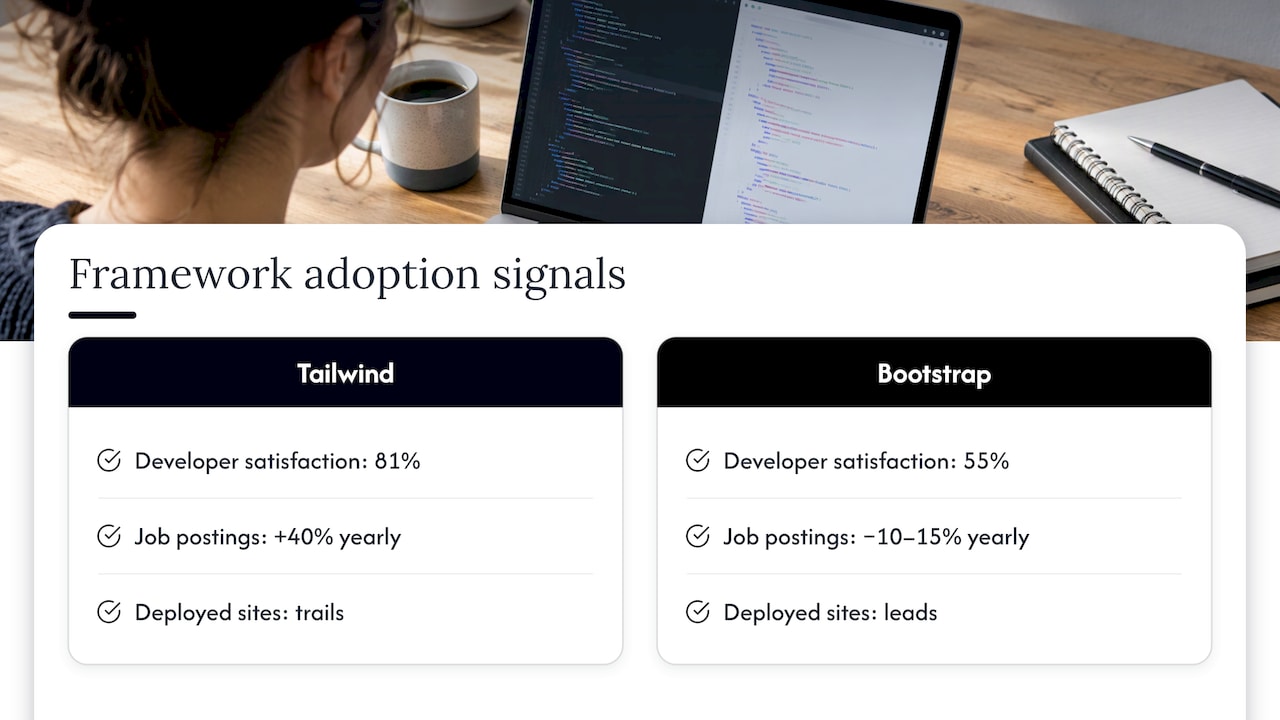
The adoption picture is mixed, depending on what you measure. On npm, Tailwind has about 23 times Bootstrap's weekly downloads, yet on jsDelivr's CDN Bootstrap gets about 116 times Tailwind's requests, according to software-lifecycle.com. DesignRevision reports that Tailwind leads in developer satisfaction (81% vs 55%), while Bootstrap leads in total deployed sites and beginner friendliness. The same source says Tailwind job postings are growing about 40% a year, while Bootstrap postings decline 10 to 15% annually.
Bootstrap is also not standing still. Bootstrap 6.0.0-alpha.1 appeared on 8 October 2026 with native dialogs and drawers, new form components, OKLCH colors, ESM-only JavaScript with no jQuery and a new responsive class syntax. It needs recent browsers (Chrome or Edge 130+, Firefox 132+, Safari 18+). Because it is an alpha, we would not start a production build on it yet.
Tailwind's future looks secure too. Tailwind Labs joined Shopify on 9 September 2026, and Adam Wathan confirmed that Tailwind will stay MIT-licensed with Shopify supporting the maintaining team. Tailwind v4 itself arrived in early 2025, with v4.1 following in April.
What each framework really costs
Both are free and open source. Neither charges by team size, so the license cost is $0 per month whether you have 5 developers or 100, according to SoftVerdict's 2026 comparison. The same analysis suggests Bootstrap may be cheaper for a short, conventional project because components come ready-made, while Tailwind may have a lower long-term cost for custom applications because developers spend less time overriding default styles.
So the real budget line is people and time, not licenses. That is why the choice should follow the product, not the trend.
How to choose: a practical checklist
Here is the decision logic we would walk a founder through. It draws on the guidance in DesignRevision's 2026 comparison.
Choose Tailwind CSS when:
- The product needs a custom, distinctive look that matches a brand.
- You are building with React, Next.js, Vue or Svelte.
- Performance matters and you want the smallest CSS bundle you can get.
- Your team has solid CSS fundamentals.
- You plan to use shadcn/ui, DaisyUI or Headless UI for components.
Choose Bootstrap when:
- You need a functional UI as fast as possible.
- Your team includes designers or backend developers with limited CSS experience.
- You are building an admin panel, internal tool or MVP where visual uniqueness is not critical.
- You are maintaining an existing Bootstrap codebase.
A few worked examples make this concrete:
- A fintech startup launching a public product with a strong brand. Tailwind, with a token set defined up front, because every screen needs to feel like the brand.
- A two-person team validating an idea with a clickable product. Bootstrap can get a usable interface on screen in days. If the idea survives, you can restyle later. Our rundown of no-code tools for building your MVP is worth a look too.
- An internal reporting tool for an operations team. Bootstrap, since polished uniqueness adds little here.
- A marketing site where conversion rate is the goal. The framework matters less than the design, copy and testing behind it. Tailwind's flexibility helps when you iterate on layouts quickly.
If you are also weighing your wider stack, we compared frameworks at the next level up in Next.js vs Remix.
Our perspective
We rarely start a project by picking a CSS framework. We start with the people who will use the product, and with what the business needs the interface to do. The framework follows from that.
Our approach is built on research, design sprints and rapid MVP work, so we care about getting something real in front of users early. For a validation round, speed to a testable screen matters most, and ready-made components can serve that purpose. When the product has to carry a brand and grow, we think in tokens, systems and components, and a utility-first approach fits that mindset well.
What we have learned is that the code is the smaller half of the work. A framework will not tell you whether your sign-up flow makes sense, or whether your checkout loses people on the third step. That comes from user testing, analytics and honest iteration. Pick the tool your team can use well, then spend your energy on the experience.
Getting the build right with Raw Studio
Picking a framework is one decision inside a larger design and development job. At Raw Studio, our web development work sits alongside UX research, UI design and conversion optimisation, so the interface you ship is shaped by evidence rather than preference.
If you want a second pair of eyes on an existing site, our Full UX/CRO Audit starts from $2,500 as a one-off, and our Design Team (Platinum) plan is $8,400 per month for ongoing design support. Both are listed on our pricing page. Not ready to commit? Request a free UX audit and we will show you where your interface can work harder.