

Error-Free UX: How to Anticipate and Prevent Errors in UX

Errors in UX design can lead to frustration, loss of trust, and even abandonment of a product. A well-designed UX minimizes the chances of user mistakes by anticipating and preventing them before they happen. Proactive error prevention ensures smoother interactions, reduces cognitive load, and enhances overall user satisfaction.
Designing with error prevention in mind requires an understanding of how users interact with interfaces, what common mistakes they make, and what strategies can be used to mitigate these issues. This article explores key approaches to creating an error-free user experience.
Table of Contents
I. Understanding Common Errors in UX
Before designing a seamless UX, it’s essential to understand the common errors in UX users make. These errors typically fall into two categories, and understanding them can help in crafting better solutions.
1. Identifying Potential Mistakes
- Analyze User Behavior: By examining user behavior through various tools like heatmaps, session recordings, and interaction analytics, designers can identify pain points and potential areas of confusion. Recognizing where users hesitate or abandon tasks provides insight into problematic areas of the design.
- Utilize Data Analytics and User Feedback: Collecting qualitative and quantitative data from user reports, customer support tickets, and direct feedback can reveal patterns in mistakes. Surveys, usability testing, and A/B testing further help in pinpointing areas that need refinement.
- Observe Real-World Usage: Conduct field studies or ethnographic research to observe how users interact with the product in their natural environment. Often, users behave differently in testing conditions than in real-life scenarios, and observing them in a practical setting helps identify errors they might not report otherwise.
- Consider Cognitive Load and Accessibility Issues: High cognitive load or lack of accessibility features can lead to errors. For instance, a form with too many fields or complex instructions may result in incorrect inputs. Studying accessibility concerns ensures the product is usable by a diverse range of users.
2. Categorizing Errors in UX
- Slips (Unintentional Actions): These occur when users inadvertently perform the wrong action, typically due to distractions, lack of clarity, or interface complexity. Examples include accidentally pressing the wrong button or closing an important window unintentionally. Such errors can often be prevented by designing with clear visual hierarchy and easy-to-recover mechanisms.
- Mistakes (Incorrect Intentions): These happen when a user fundamentally misunderstands how a system works. For example, if a button is labeled ambiguously, a user may click it expecting one result but experience a different outcome. Providing clear labeling, intuitive layouts, and progressive onboarding can reduce these types of errors.
- Rule-Based Errors: These occur when users follow an incorrect process based on learned behavior or misunderstanding of system rules. For instance, if an app follows a different gesture-based navigation system than industry standards, users might apply familiar actions that don’t work as expected.
- Memory-Based Errors: Users might forget essential steps in a process due to excessive complexity or poor information architecture. Designing with progressive disclosure, contextual guidance, and visual cues can help reduce reliance on memory.
Recognizing these distinctions allows designers to create targeted solutions that prevent errors from occurring in the first place, leading to a more seamless and intuitive user experience.
II. Strategies for Error in UX Prevention
Once potential errors in UX have been identified, designers can implement strategies to prevent them effectively.
a. Simplify User Interfaces
A cluttered or confusing interface increases the likelihood of mistakes. A well-designed UI should:
- Be intuitive: Follow standard design conventions so users don’t have to guess.
- Be concise: Use clear, jargon-free language and simple instructions.
- Prioritize clarity: Avoid unnecessary elements that distract or confuse users.
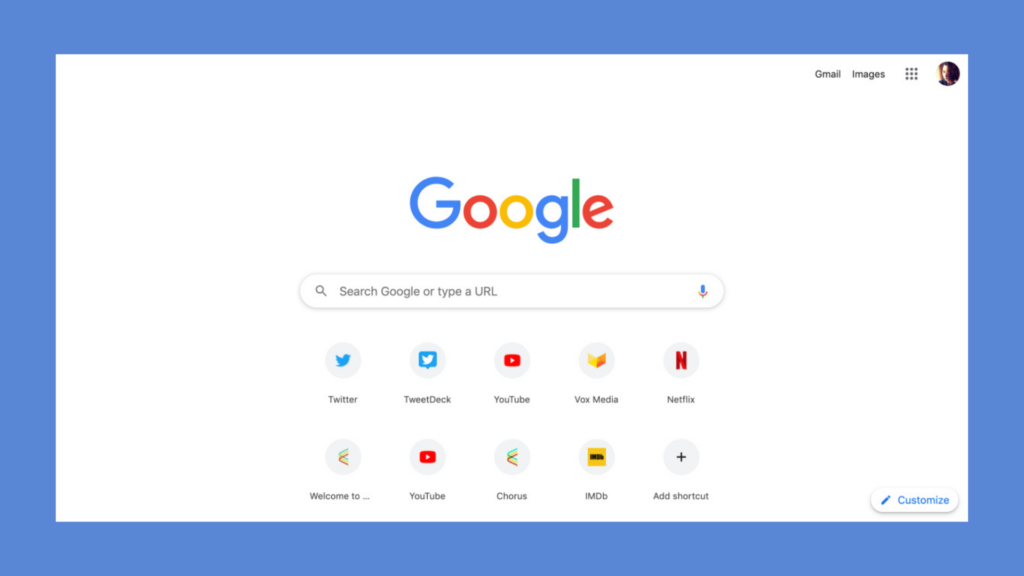
For instance, Google’s homepage is a prime example of simplicity, offering a clean interface focused on a single action: search.
Additionally, designers can:
- Use whitespace effectively to prevent visual clutter.
- Organize content hierarchically, guiding users to key actions first.
- Reduce cognitive overload by minimizing the number of required interactions.
b. Provide Real-Time Feedback
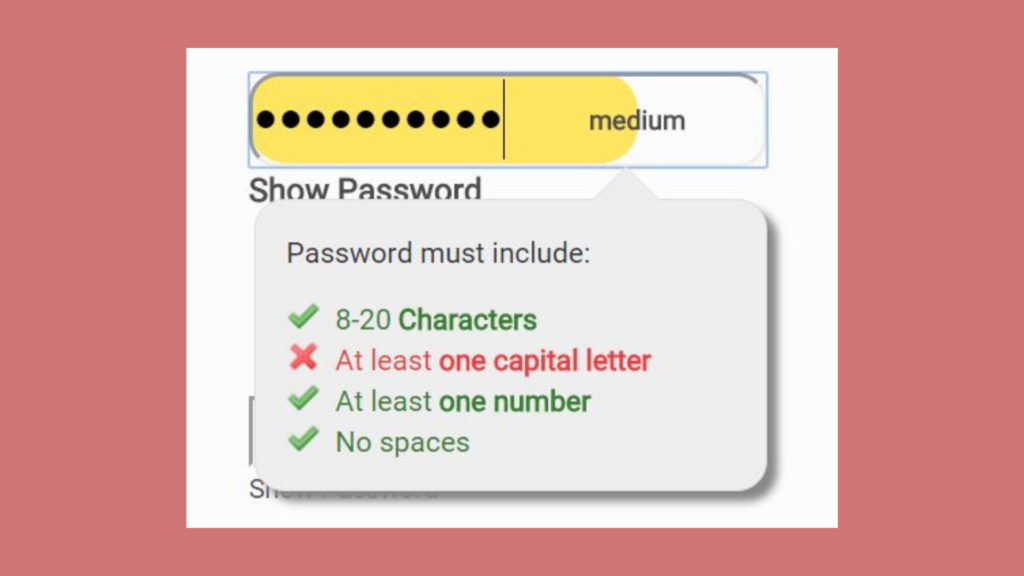
Users need immediate confirmation of their actions to ensure they’re on the right path. Real-time feedback can be implemented through:
- Error messages: Display alerts when an action isn’t possible (e.g., invalid form inputs with specific instructions).
- Visual cues: Highlight fields requiring user attention (e.g., changing a field’s border color to red for errors).
- Confirmations: Provide success messages or animations when an action is completed correctly.
For example, modern password managers and authentication systems, like those in Google Chrome and Apple’s iCloud Keychain, provide real-time feedback on password strength, offering users visual indicators such as color-coded bars and textual guidance (e.g., “Weak,” “Strong”). Additionally, platforms like Dropbox suggest auto-generated secure passwords while allowing users to copy and paste them seamlessly, reducing the risk of weak password choices. These implementations guide users toward better security practices without disrupting their workflow.
Further improvements include:
- Using tooltip explanations to provide additional context.
- Providing inline validation to correct errors instantly.
- Using non-disruptive notifications to ensure feedback does not distract the user.
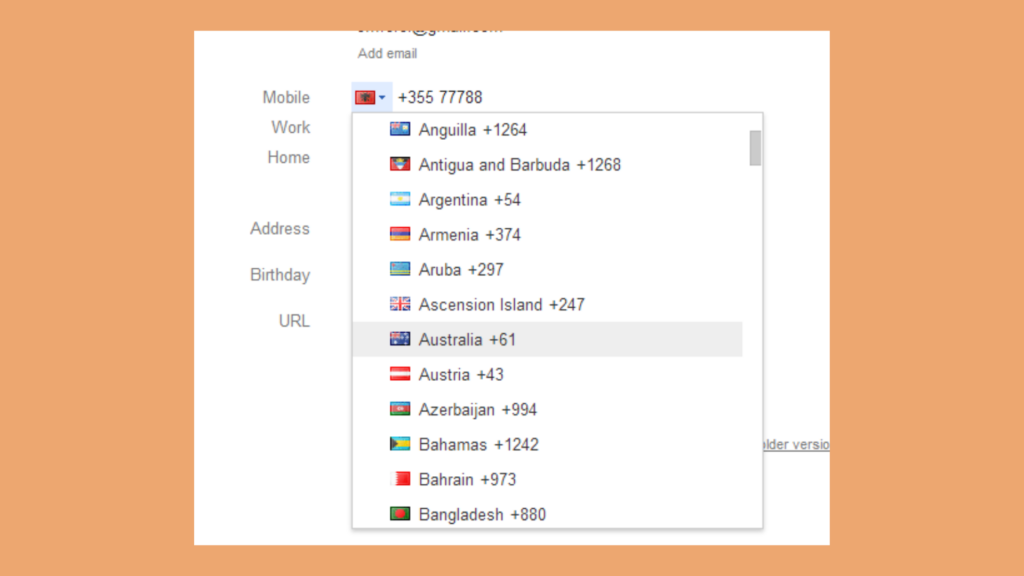
c. Implement Constraints and Affordances
Designing with constraints and affordances helps guide user actions and prevent errors before they happen.
- Constraints: Restrict user choices to prevent incorrect inputs (e.g., greying out an unavailable button until a required action is taken).
- Affordances: Design elements that naturally suggest their functionality (e.g., raised buttons indicating clickability).
For example, the phone number input field in Google Contacts automatically formats numbers based on the country code, preventing users from entering incorrect or incomplete numbers. Similarly, e-commerce platforms like Shopify implement real-time formatting and validation, ensuring that users enter phone numbers in a standardized format, reducing errors and increasing the accuracy of contact details.
Additional techniques include:
- Using step-by-step guidance to lead users through complex tasks.
- Designing progressive disclosure menus to prevent overwhelming first-time users.
d. Offer Error Recovery Options
Mistakes will happen despite the best design efforts. Providing error recovery features ensures users don’t feel stuck or frustrated.
- Undo and Redo Functions: Allow users to reverse actions easily, reducing fear of making mistakes.
- Helpful Error Messages: Avoid generic messages like “Error occurred.” Instead, provide actionable guidance such as “Invalid email format. Please use [email protected].”
- Confirmation Steps: For irreversible actions (e.g., deleting an account), ask users to confirm their choices to prevent accidental deletions.
For example, Gmail’s “Undo Send” feature helps prevent regretful email sends by allowing users to retract messages within a few seconds.
Additional safeguards include:
- Providing automatic backups to prevent data loss.
- Allowing users to revert to previous versions in complex workflows.
Conclusion
An error-free UX is not about completely eliminating mistakes—it’s about designing in a way that anticipates and prevents common user errors before they become frustrations. By simplifying interfaces, providing real-time feedback, implementing constraints, and offering robust error recovery options, designers can create seamless and frustration-free experiences.
Testing and iteration ensure that UX remains responsive to user needs, making the experience more intuitive and efficient. As technology advances, integrating AI-driven assistance, predictive analytics, and smarter UI elements will further enhance error prevention.
By prioritizing user error prevention, businesses can improve engagement, retention, and overall satisfaction, leading to a more successful product.
Get a UX & CRO Expert’s Eyes on Your Website. Book a free 30-minute UX Teardown and get actionable insights on what’s costing you conversions — no fluff, just fixes you can implement right away.
Book a Free UX Audit

Related posts
No-Code Fintech Solutions: Optimizing User Experience for Mobile-First Banking Apps in 2024
The banking industry is undergoing a digital revolution, with mobile-first strategies taking center stage. As consumers increasingly rely on smartphones […]

Prototyping: A Startup Founder’s Secret to Success
We’ve had so many grass-root startups come up to us with an extraordinary product idea but don’t know where to […]

Level Up Your Onboarding: How Canva Personalizes for User Success
In the fiercely competitive world of apps, grabbing a user’s attention is only half the battle. The true test lies […]
Creative product design that gets results
Take your company to the next level with world class user experience and interface design.
get a free strategy session
