.svg)
.svg)


The digital design landscape is evolving rapidly, and the shift from 2024 UX trends to the priorities of 2026 is unmistakable. Today, companies building and scaling digital products are focusing more on outcome-driven design where every UX decision supports measurable growth and business goals. The excitement around experimental layouts and flashy visuals is giving way to clarity, trust, and predictable user experiences that help users engage intuitively and efficiently.
If you are a founder, designer, or UX professional, understanding the latest UX trends and how they shape the design process is crucial to staying ahead of competitors who are still designing for yesterday’s standards. This article explores the most important UI and UX design trends for 2026, emphasizing how user needs and business goals intersect in creating meaningful digital experiences.
The New Design Landscape
Design used to be celebrated for novelty and bold visuals, but by 2026, the focus has shifted significantly toward usability, accessibility, and delivering measurable results. UX design trends now prioritize faster execution and clearer interfaces that help users interact seamlessly with digital products. This evolution is evident in popular tools like Notion and Shopify, which exemplify this shift.
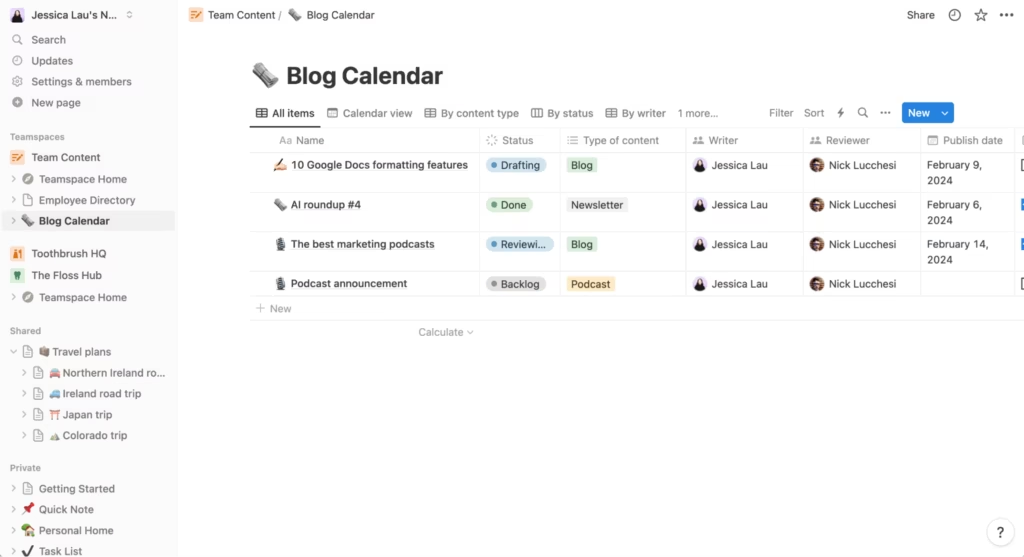
Notion employs a clean, minimalistic design that centers on user workflow, helping users focus on their tasks without distraction. Shopify, on the other hand, emphasizes clear navigation and direct actions to reduce merchant friction and improve conversion rates. Both platforms rely on well-tested usability principles, supported by extensive user research and guidelines from authorities like the Nielsen Norman Group.
This transition highlights a broader movement in UX design: moving away from purely aesthetic innovation toward interfaces that deliver real user value and align with core business objectives.
UX Must Prove Its Business Value
A defining UX trend for 2026 is the increasing demand for design to demonstrate tangible business outcomes. Many companies are integrating UX teams directly into product and engineering workflows only when UX efforts clearly support revenue growth, user retention, or activation metrics.
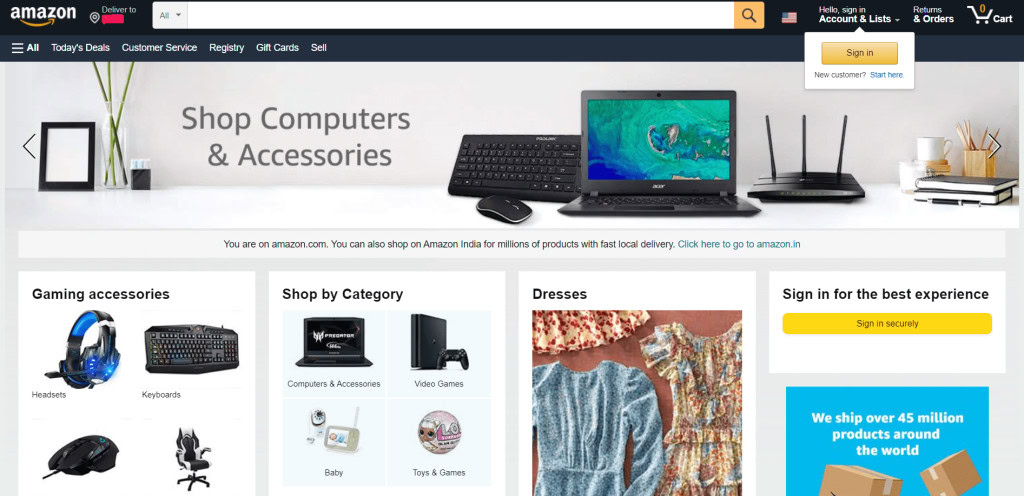
Amazon perfectly illustrates this pragmatic approach. Its user interface may lack aesthetic appeal, but every element is designed to optimize conversion and facilitate decision-making. Similarly, Duolingo uses UX design to enhance retention through streaks, progress mechanics, and engaging visuals that encourage daily activity. These are not just nice-to-have features; they are strategic elements grounded in data and user behavior.
For UX designers aiming to align their work with business goals, frameworks like design thinking offer valuable insights into how the design process can drive measurable outcomes and customer satisfaction.
Large UX Conferences Are Fading
Another notable trend is the decline of large-scale UX conferences. Attendance is dropping, and many events that once defined the design calendar are shrinking or disappearing. Instead, designers increasingly learn from product leaders, online education platforms, and continuous internal training rather than one-off presentations.
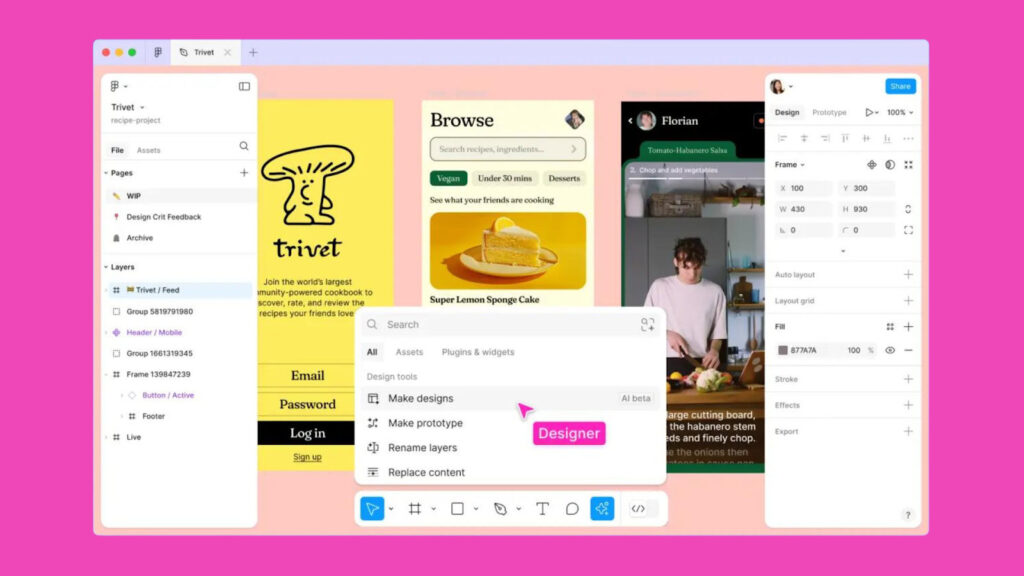
Figma exemplifies this shift by offering AI-powered tools and design workflows that provide ongoing education and practical case studies for UX teams. Similarly, Webflow University delivers in-depth tutorials on interaction and UI design that surpass many traditional workshops.
Within organizations, companies like Stripe and Airbnb are fostering internal learning loops that keep UX designers sharp year-round. This cultural change reflects a move toward continuous professional development and collaborative knowledge-sharing, which helps teams stay current with emerging trends and technologies.
Design Is Returning to Familiar Conventions
In 2026, one of the most important UX trends is a return to strong, predictable design patterns that users recognize and trust. Familiar interfaces allow users to take action quickly without cognitive overload, enhancing user engagement and satisfaction.
Tools like Linear and Notion thrive because they use classic, efficient layouts that feel polished and intuitive. Notion’s page and block patterns feel immediately comfortable, while Linear’s streamlined interface supports fast navigation and task completion. These products balance familiarity with thoughtful motion and speed, elevating conventional UI design.
Designers face the challenge of maintaining intuitive design while ensuring their products have a distinct identity that supports brand recognition. Resources like Awwwards provide ongoing analyses of UI design patterns shaping the web, helping designers stay informed about current visual trends and best practices.
How to Test and Audit an Interface
Validating a familiar pattern starts with picking the key tasks users actually need to complete, like checking out or finding a setting. Define what success looks like (task completed without hesitation) and what failure looks like (abandonment, repeated clicks, or asking for help).
Test these tasks with real representative users, note every point of friction, then prioritize fixes by how often they block progress. Retest after changes to confirm the fix worked.
An accessibility audit should run alongside usability testing:
- Confirm keyboard-only navigation moves through interactive elements in a logical order matching the page’s visual flow.
- Check that focus order never skips or traps users.
- Verify text contrast meets WCAG 2.1’s minimum ratio of 4.5:1 for normal text and 3:1 for large text.
- Make sure form fields and controls have labels programmatically tied to them for assistive technology.
Regional UX Trends Are Shaping Global Design
As digital products expand globally, regional UX trends are becoming increasingly influential in shaping user experiences worldwide. User needs, digital behaviors, and cultural norms vary significantly across regions, requiring designers to adapt their approaches accordingly.
In Southeast Asia, companies like Grab and Gojek have revolutionized ride-hailing, delivery, and payments by designing interfaces that reflect local habits, payment methods, and cultural expectations. In India, platforms such as Paytm and PhonePe have scaled digital payments by prioritizing trust, clarity, and language accessibility.
Understanding these regional differences is essential for UX professionals aiming to create personalized user experiences that resonate across diverse markets. Comprehensive guides on global UX variations provide valuable insights into how user interface design must evolve to meet localized user needs and expectations.
New Platforms Are Forcing New UX Standards
The emergence of new devices and platforms is pushing UX designers to rethink how users interact with software. Spatial computing, augmented reality (AR), virtual reality (VR), and wearable tech are creating fresh demands for interface design and user engagement.

Apple Vision Pro apps highlight this shift, as designers cannot simply port mobile UI to 3D environments. Instead, they must consider gesture controls, eye tracking, spatial placement, and presence to create immersive experiences that feel natural and intuitive. Apple’s Human Interface Guidelines offer essential best practices for designing in these new spatial contexts.
Wearables like the Oura Ring and Whoop require calm, meaningful UI that prioritizes data storytelling over complex visuals. These devices focus on delivering user value through subtle interactions and personalized user experiences.
Early adoption and experimentation with these new platforms provide a competitive advantage for UX teams willing to innovate with emerging technologies.
AI and Automation Are Part of Every Modern Workflow
AI integration has become indispensable in the modern UX design process. From wireframing and copywriting to synthesizing user research and accessibility checks, AI-powered tools are transforming how UX designers work.

This trend started gaining momentum in 2024 but has now become a core component of every design workflow. For example, Figma’s AI enhancements enable designers to generate layout variations, restructure components, and produce content instantly, accelerating the design process.
Tools like Galileo and Magician assist with rapid prototyping and design system management, helping UX teams focus on more strategic tasks. Ignoring AI tools means slower delivery and falling behind in an increasingly competitive landscape.
How to Use AI Responsibly in UX Design
AI speeds up design work, but responsible use means putting a few safeguards around it. Start with the data: keep sensitive user research inputs out of tools that store or train on them without clear consent.
Before shipping anything AI helped generate, review it with a specific lens:
- Check generated copy, layouts, or imagery for bias that could exclude or stereotype user groups.
- Confirm accessibility wasn’t lost in the shuffle, like contrast or alt text on AI-suggested visuals.
- Disclose AI’s role when it meaningfully shaped the final product, so users know what they’re interacting with and keep control over their data and personalization settings.
- Treat AI output as a draft, not a verdict: validate decisions against real user motivation and engagement evidence, not the model’s confidence.
Human judgment still owns the final call.
Visual Design Is Becoming Cleaner, Softer, and More Accessible
Visual design in 2026 emphasizes calmness, inclusivity, and clarity. Interfaces are adopting larger typography, softer edges, increased spacing, and thoughtful color contrast to improve readability and aesthetic appeal.
Products like Headspace, Calm, Canva, and Google Workspace lead this movement by creating emotionally resonant and enjoyable experiences that help users focus and feel supported. This shift is closely linked to accessibility, which is no longer just a nice-to-have but a strategic necessity for reaching global audiences.
Following the Web Content Accessibility Guidelines (WCAG) ensures that digital experiences are usable by people with diverse abilities, reinforcing good UX practices and enhancing customer satisfaction.
How Sustainability Can Guide UX Decisions
Sustainable UX choices tend to double as better usability choices. A few places to start:
- Trim unnecessary animation and oversized, unoptimized images: lighter pages load faster, which helps performance and accessibility together.
- Cut network requests that aren’t earning their keep, like tracking scripts or redundant third-party integrations.
- Offer dark mode as a real design option, not an afterthought; it can ease eye strain and improve efficiency on OLED screens.
- Reduce visual clutter so interfaces feel calmer and more sensory-friendly, a goal that overlaps with inclusive design.
- Favor leaner code and smaller page weights over feature creep that adds load without adding value.
None of this requires sacrificing clarity or accessibility. Usually it reinforces both.
Final Thoughts
The overarching theme across all UX design trends for 2026 is intention. The design world is maturing, moving away from flashy visuals toward purposeful, outcome-driven interfaces. UX designers and UI designers who embrace predictable patterns, leverage AI tools, continuously learn, design for emerging devices, and prioritize accessibility will create digital products that users trust and enjoy.
By focusing on the core principles of good UX, meeting user needs, supporting business goals, and delivering personalized user experiences, designers can craft interfaces that not only look good but also drive meaningful engagement and growth in an ever-evolving digital landscape.