
One Page Web App Security Checklist for Product Teams

Require a one-page security alignment document before you sign off on any build, and attach evidence for these items: MFA on privileged accounts, secrets management with no shared .env files, a threat model delivered during design, dependency scanning with an SBOM, locked-down CI/CD access, a patching and incident response plan, and named ownership of code and accounts. If your agency can’t produce that document with evidence attached, note it as a concern.
Table of Contents
What This Web App Security Checklist Covers and How to Use It
This checklist isn’t a technical audit tool. It’s a way to turn vague reassurances from a development agency into specific, checkable commitments. For each item below, record three things: whether it applies to your project, who owns it, and what evidence is provided.
Not every item carries equal weight. An internal tool with no customer data doesn’t need the same rigor as a fintech product handling account numbers. Rank items by impact and exposure, not by how long the list feels.
Use this minimal evidence format for every row:
- Status: pass, fail, or not applicable (with a reason)
- Owner: the named person or team responsible
- Evidence: a link to the scan report, config, or document
- Remediation target: a remediation goal date if applicable
If you want a formal assurance structure behind this, map items to the OWASP Product Security Guide or the more granular OWASP ASVS verification levels. For a broader gut check, AppSecSanta’s 50-point checklist is a solid review prompt, though a raw pass count there tells you less than tracking which high-impact items failed and why.

What Security Checks Belong in Discovery and Design?
Security decisions made after the wireframes are locked cost far more to fix than decisions made during discovery. Require these outputs before development starts, not after.
- Threat model: ask for a short document naming the assets worth protecting, the realistic threats against them, and the attack paths an attacker would try first.
- Data classification: decide upfront what counts as sensitive (health records, payment details, personal identifiers) and what minimum security level applies, including any compliance obligations tied to your industry or region.
- Auth and secrets plan: get the proposed authentication and authorization pattern in writing, plus how secrets get stored. The answer should involve a vault or secret manager with short-lived keys, never a shared
.envfile passed around in Slack.
Treating security as a product requirement rather than a late-stage audit is an important mindset shift that helps teams avoid costly issues. Building products securely is a product management problem as much as an engineering one, and it starts with what you put in the brief.
Pro Tip: Ask your agency to walk you through their secrets-management setup live during a call, not describe it in an email. If they can’t show you a vault dashboard or an access log in under two minutes, that’s worth noting.
Which Development-Stage Security Evidence Should You Request?
Sprints move fast, and security checks get skipped when nobody’s asking for proof. Request these three things at every release candidate, not just at final delivery.
- Automated scan reports. Static analysis (SAST), software composition analysis (SCA), and dependency scanning should run inside the CI pipeline automatically, not as a manual afterthought. Ask for the scan reports attached to each release candidate, not a verbal confirmation that “we run scans.” These three tools catch different failure classes, and using them together is what current best practice recommends.
- Secrets access proof. Confirm the team is using a proper vault with audited access logs, and that pipeline jobs authenticate with short-lived credentials rather than long-lived keys copied into config files. This is one area where concrete evidence beats promises every time, because “we’re careful” isn’t a control.
- Auth path tests. Ask for test coverage on login, password reset, and role-based permission paths, plus a short manual checklist confirming that a standard user can’t access admin functions by changing a URL or parameter.
What Production and Deployment Controls Should You Verify?
Once live, focus on active monitoring:
- Confirm TLS configuration across domains and a documented certificate rotation policy; enabling HSTS helps prevent downgrade attacks.
- Clarify who owns patching and the schedule; vague answers are insufficient. Request evidence of recent patching.
- Obtain the incident response plan and escalation SLAs. Plans need testing to prove capability.
Include documentation for certificate management, patch cadence with recent evidence, the incident response runbook with SLAs, and evidence of at least one practice exercise.
Pro Tip: Ask about the last rehearsal date of the incident response plan, since unpracticed plans may fail in real events.
What Handover Clauses Protect Your Ownership After Launch?
The riskiest moment in most agency relationships isn’t launch day. It’s the weeks after, when ownership of code, hosting, and accounts is still ambiguous and the agency that built everything is the only one who can access it.
Insist on contract clauses that explicitly transfer ownership of your source code repository, hosting accounts, domain registry, and backups, with a stated timeline for that transfer. Pairing that with a documented incident response plan and notification SLAs keeps you from being left waiting during a breach because nobody defined who calls whom first.
- Full ownership transfer of code, hosting, domains, and backups, with a named date
- A current list of who holds admin access, whether keys are time-limited, and where audit logs for production changes live
- A defined maintenance scope after launch, with remediation SLAs and a clear line between what’s covered by retainer and what’s billed separately
Operational tasks like secret rotation and dependency patching get left out of contracts more often than you’d expect. Name who does each task and how they report evidence of having done it.
How Do You Run a Security Acceptance Check at Handover?
Before you sign off, run through this sequence at the final demo. It takes under an hour and it’s the closest thing to a security audit most non-technical teams need to perform themselves.
- Request the artifact set. Ask for SAST, DAST, and SCA reports, an SBOM or dependency manifest, a walkthrough of the secrets-management setup, the incident response runbook, and recent audit logs.
- Run four quick tests. Confirm MFA is enforced on privileged accounts, confirm a standard-role account can’t reach admin functions, check what API endpoints are publicly exposed, and request a demonstrated restore from backup.
- Log everything with a name attached. Every item gets a status, an owner, and evidence in a shared tracker. Nothing gets marked “pass” without a link proving it.
- Get sign-off from a named accountable person. Not “the team.” One person whose name is on the line if something breaks later.
There’s no universal checklist that fits every build. Cadence, tools, and remediation targets should scale with how sensitive your data is and how often the product changes.
How Should Session Management and Cookies Be Handled?
Because session handling affects trust, confirm that session tokens expire after a reasonable inactivity period and that logging out invalidates sessions server-side rather than just locally.
Cookies with session data should be marked with the HttpOnly, Secure, and SameSite flags to protect against client-side script access, ensure encrypted transmission, and limit cross-site risks.
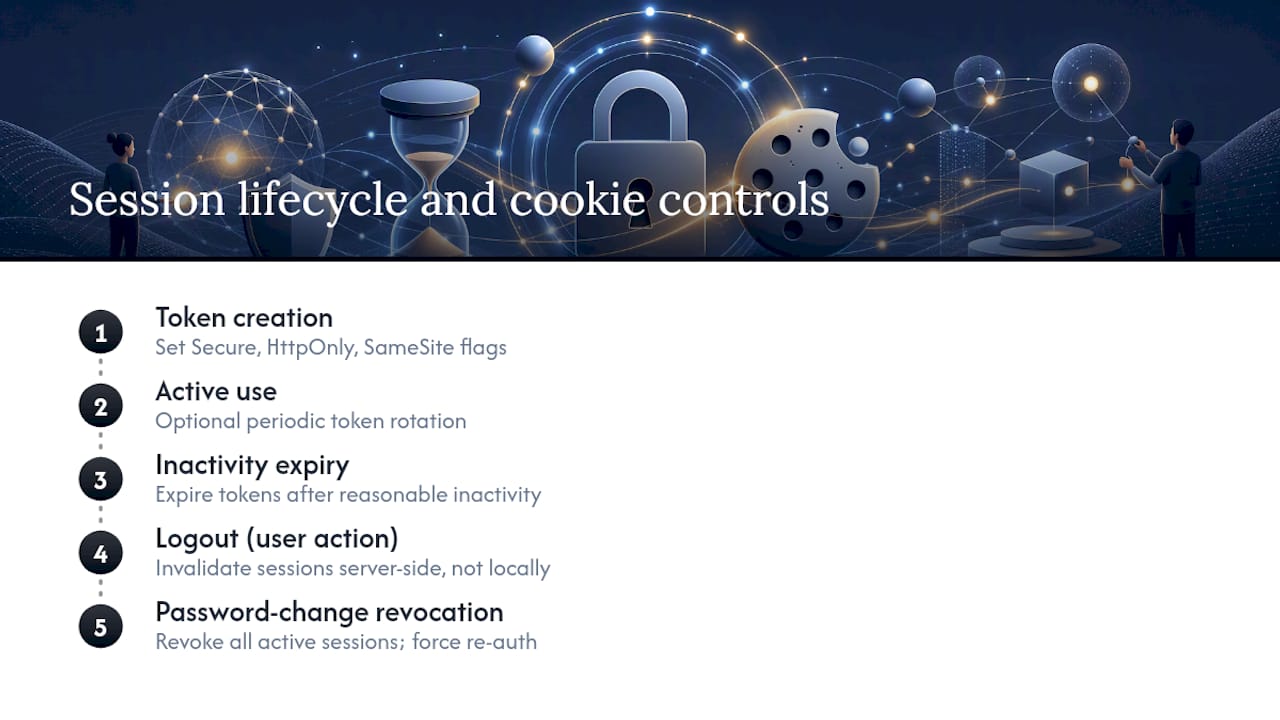
Clarify the process after password changes or suspected compromises; a secure system invalidates all active sessions forcing re-authentication. If sessions remain active until natural expiration, consider this a pre-launch concern.
For sensitive products, verify whether session tokens periodically rotate during normal use to mitigate risks associated with static session identifiers.
How Do You Confirm Input Validation Is Actually in Place?
Almost every serious web breach traces back to unvalidated input somewhere. SQL injection, cross-site scripting, and command injection all exploit the same basic gap: the app trusted data it should have checked first.
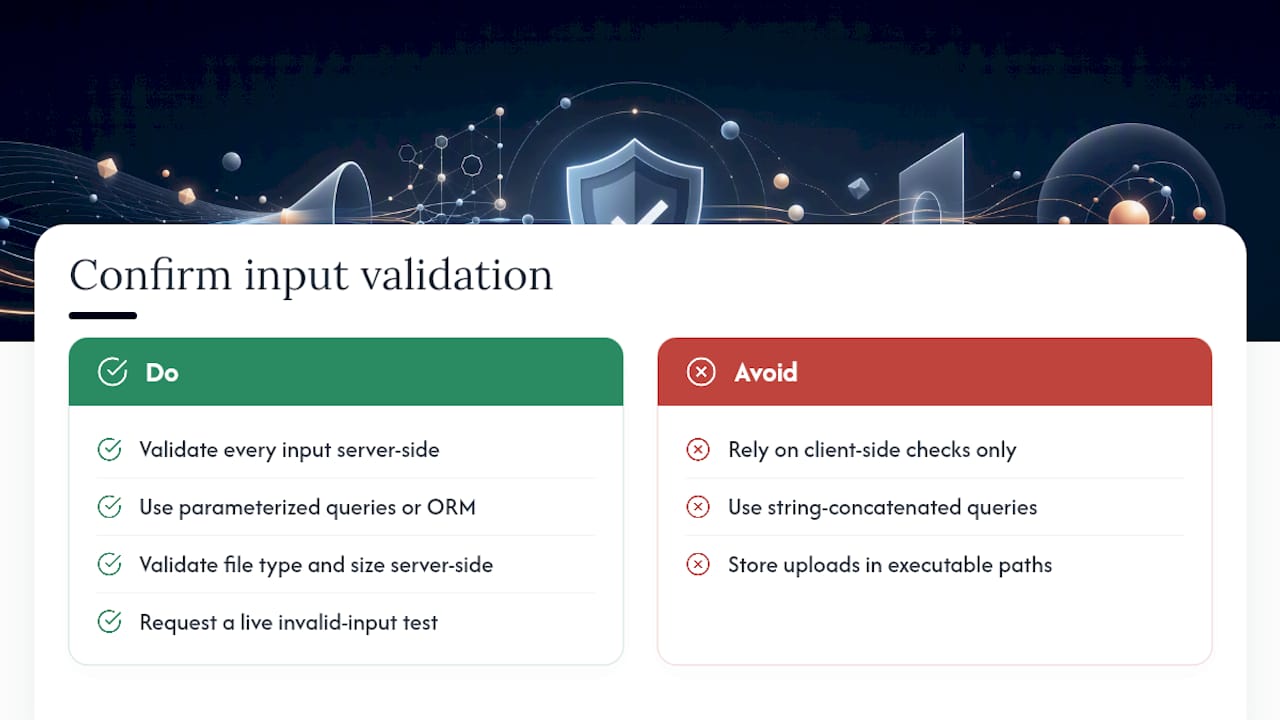
You don’t need to read code to verify this is handled. Ask your agency two direct questions. First, does every form field, API parameter, and file upload get validated against an expected format before it touches the database or gets rendered back to a user? Second, are database queries built using parameterized statements or an ORM, rather than string concatenation that pastes user input directly into a query?
File uploads deserve their own line item. Confirm the app performs server-side validation of file type and size, beyond client-side checks, and that uploaded files are stored in locations that prevent code execution.
Ask to see this tested, not just described. A quick way to validate the claim without any technical skill: ask the agency to show you what happens when a test form field receives an unexpected character sequence, like an apostrophe or an angle bracket. A properly validated app should reject or safely handle it instead of throwing a raw database error onto the screen, which itself is a sign the app is leaking internal information to anyone who probes it.
What Logging and Monitoring Should Catch Suspicious Activity?
A breach that goes unnoticed for weeks does far more damage than one caught in minutes. Logging and monitoring are what stand between those two outcomes, and they’re often the first thing cut when a build runs behind schedule.
At minimum, ask for logging on authentication events (successful and failed logins), permission changes, and any access to sensitive data. Failed login attempts specifically should trigger alerting once they cross a reasonable threshold, since a spike in failed logins is one of the earliest signs of a credential-stuffing attempt.
Logs are only useful if someone is actually watching them. Ask who reviews alerts, how quickly they respond, and whether monitoring runs around the clock or only during business hours. A product handling customer data that only gets checked when someone happens to notice a problem isn’t really monitored.
Confirm logs themselves are protected. If an attacker who compromises a system can also delete or edit the logs of that compromise, you have no reliable record of what happened. Logs should write to a separate, access-restricted location, and retention periods should be long enough to support an investigation weeks after the fact, not just a few days.
What GDPR and Data Privacy Steps Does Your Checklist Need?
If your product touches personal data from users in the European Union, or you simply want to build to a defensible privacy standard regardless of where your users are, a handful of GDPR-aligned practices belong in your checklist regardless of your primary market.
Confirm the agency can explain data minimization in plain terms: collecting only the personal data the product actually needs, not everything a form could theoretically capture. Ask how long personal data is retained and whether there’s an automated process to delete it once it’s no longer needed, rather than a policy that exists only on paper.
Consent and deletion mechanics matter just as much as encryption. Users should be able to request their data or ask for it to be deleted, and the system needs a real workflow to fulfill that request within a reasonable window, not a support ticket that quietly goes nowhere.
Data at rest and in transit should be encrypted using current standards, and any third-party processor your app relies on (analytics tools, email providers, payment processors) should be named in a data processing record. If your agency can’t tell you which third parties touch your users’ data, that’s a gap in the build, not just the paperwork.
An Editorial Take on What Separates Credible Agencies From Weak Ones
The teams that get burned aren’t the ones who skipped a scanning tool. They’re the ones who treated security as a phase instead of a requirement woven through every sprint. Watch for vague routines, no proof of secrets management, or an inability to name who’s accountable when something breaks. A credible agency answers in specifics and hands you evidence unprompted. Push for that one-page alignment document during discovery, before a single line of code gets written.
— Philippe
How Raw Studio Can Help You Validate Your Build
A direct partner option exists if you’d rather skip the back-and-forth of policing another vendor’s promises. Our web development work is built around the same principle this checklist pushes: security decisions made in discovery, not bolted on before launch. Our UX design process, including Rapid MVP sprints, builds the alignment doc and evidence trail into the project from day one rather than treating it as paperwork at the end.

If you’re mid-project with another agency and just need a second set of eyes, our Free UX Audit is a practical way to get an outside read on what’s actually been delivered against what was promised, including whether the security fundamentals in your handover pack hold up. If you’d rather compare delivery models before committing, Omnivance Media’s custom software services are worth a look, and teams wanting deeper penetration testing beyond what this checklist covers can look at AetherKey’s red-team services. Consider booking a Free UX Audit and bringing your current handover documentation. You’ll receive plain feedback on what’s solid and what’s missing.
Get a UX & CRO Expert’s Eyes on Your Website. Book a free 30-minute UX Teardown and get actionable insights on what’s costing you conversions — no fluff, just fixes you can implement right away.
Book a Free UX Audit

Related posts

How Much Does UX/UI Design Cost in Australia? (2026 Pricing Guide)
If you have asked three design agencies for a quote and received three wildly different numbers, you are not alone. […]

Top 10 Creative Design Agencies in Australia in 2026
By 2026, creative design agencies in Australia have moved far beyond just making things look good. The top agencies now […]
The Aesthetics of Calm UX: How Blur and Muted Themes Are Redefining Digital Design
Have you noticed how apps and websites just feel gentler these days? Like they’re whispering instead of shouting? There’s a […]
Creative product design that gets results
Take your company to the next level with world class user experience and interface design.
get a free strategy session
