

Usability Testing 101: Methods, Sample Sizes and What to Measure

Most teams do not realise their product is confusing until users tell them.
Sometimes the warning comes through a growing number of support tickets. Sometimes conversion rates start to fall. In other cases, users simply abandon a checkout, onboarding flow, or sign-up process without explaining what went wrong.
By then, fixing the problem can be expensive.
Usability testing helps teams catch these issues much earlier. Instead of waiting until a product is live, you watch real users try to complete realistic tasks and pay attention to where they hesitate, make mistakes, or give up.
The idea is simple, but the insight can be incredibly useful.
A survey can tell you what people say about a product. Analytics can show you where users drop off. Stakeholders can share what they believe is wrong. Usability testing shows you what people actually do when they are sitting in front of the experience.
That makes it one of the most practical ways to answer questions such as: Can users complete the task that matters most to the business? Where do they get confused? How long does the process take? What makes them abandon it? Would a redesign actually solve the problem?
This guide covers the main usability testing methods, the difference between moderated and unmoderated testing, how many participants you need, the 5 user rule in usability testing, how to write useful test scenarios, the System Usability Scale, and the usability testing metrics worth tracking.
If you are still at the discovery stage and need to understand users before testing an interface, Raw Studio’s guide on how to conduct better user interviews is a useful companion piece.
Table of Contents
What Is Usability Testing?
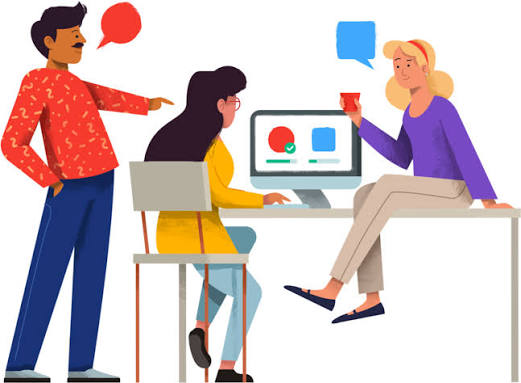
Usability testing is a research method where representative users attempt realistic tasks while researchers observe how they interact with a product, website, prototype, or service.
The goal is not to ask whether someone likes a design.
It is to understand whether they can actually use it.
For example, imagine you are testing an ecommerce checkout. Instead of asking participants, “Do you think this checkout is easy to use?” you might give them a product and ask them to complete a purchase.
Then you watch.
Can they find the checkout button? Do they understand the delivery options? Does anything make them stop? Are they unsure which payment method to choose? Do they make mistakes when entering information?
Those behaviours often reveal problems that would never appear in a stakeholder review.
This is why usability testing works so well alongside analytics. Analytics tells you that users are dropping out at a certain point. Usability testing can help you understand why.
If your product already has performance or conversion problems but you are unsure where they come from, a broader UX audit can also help identify where qualitative research and usability testing should focus.

What Can Usability Testing Actually Tell You?
Good usability testing answers practical questions.
Can a first-time user complete the sign-up process without help?
Can customers find the information they need before making a purchase?
Can users understand your pricing?
Where do people hesitate during onboarding?
Which parts of the interface cause errors?
Does a new design actually make an important task easier?
These questions matter because a design can look polished and still be difficult to use.
A button can be visually beautiful but impossible to find. A checkout can feel clean but leave customers unsure about delivery costs. An onboarding flow can have excellent illustrations while users struggle to understand what they are supposed to do next.
Usability testing separates what looks good in a design review from what actually works when a real user interacts with it.
What Are the Main Usability Testing Methods?
There is no single usability testing method that works for every project.
The right approach depends on what you want to learn, where the product is in its development cycle, how much time you have, and how deeply you need to understand the user’s behaviour.
The most common distinctions are moderated vs unmoderated usability testing, remote vs in-person testing, and qualitative vs quantitative testing.
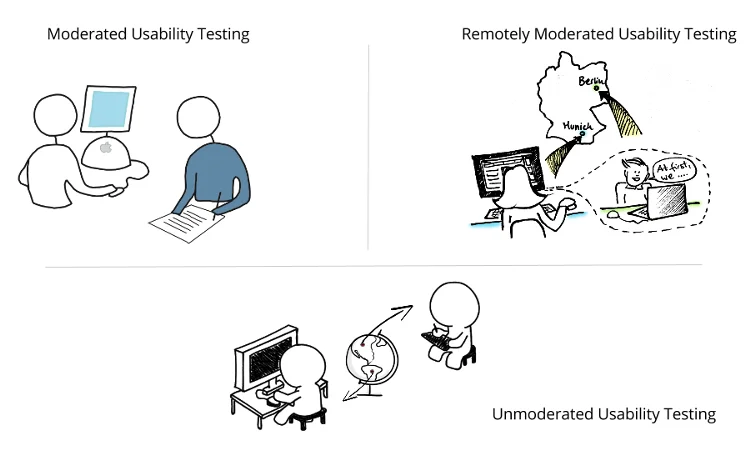
Moderated vs Unmoderated Usability Testing
In moderated usability testing, a researcher joins the session and guides the participant through the study.
The moderator introduces the scenario, gives the participant tasks, observes their behaviour, and asks follow-up questions when something interesting happens.
For example, if a participant suddenly stops during checkout, the moderator might ask, “What are you thinking right now?”
That ability to explore a moment of confusion is the biggest advantage of moderated testing.
It is particularly useful for early-stage products, complicated workflows, unfamiliar concepts, or research questions where understanding the reason behind the behaviour matters as much as the behaviour itself.
The trade-off is time. Each session has to be scheduled and run individually, which can make moderated research slower and more expensive.
Unmoderated usability testing works differently.
Participants receive instructions and complete the tasks by themselves, usually through a testing platform that records their screen, interactions, and sometimes their voice.
Because a moderator does not need to attend every session, unmoderated testing is easier to scale. You can collect feedback from more participants in less time.
The disadvantage is that you cannot ask a follow-up question at the exact moment someone becomes confused.
As a general rule, moderated testing is useful when you need to understand why something happens. Unmoderated testing is useful when you already have a clearer hypothesis and want to test it across more users.
Remote vs In-Person Usability Testing

Remote usability testing has become common because it is easier to organise and allows teams to recruit participants regardless of location.
For most websites, SaaS platforms, apps, and other digital products, remote testing can provide everything a team needs.
In-person testing still has a place when physical context matters.
For example, you may want to test a self-service kiosk in the environment where it will actually be used. A field application used outdoors may also behave very differently from the same application tested from a participant’s desk.
The format should follow the research question.
Do not choose in-person testing simply because it feels more formal, and do not choose remote testing only because it is convenient.
Qualitative vs Quantitative Usability Testing
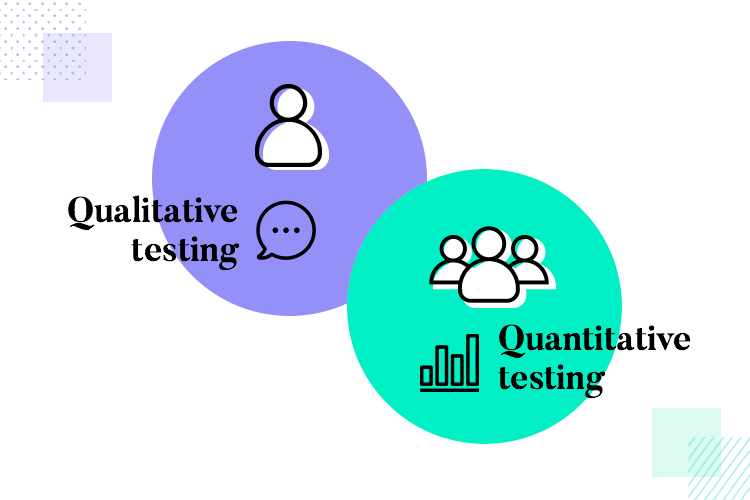
Qualitative usability testing is mainly about discovering problems and understanding behaviour.
It normally uses a relatively small number of participants. Researchers watch what happens, listen to what users say, and look for patterns across sessions.
Quantitative usability testing focuses more on measurement.
You might compare completion rates between two versions of a checkout, measure how long users take to complete a particular task, or benchmark usability before and after a redesign.
Most product teams need qualitative testing more often because it helps uncover problems while there is still time to fix them.
Quantitative research becomes more useful when you need stronger measurement, benchmarking, or evidence that one version performs better than another.
How Many Users Do You Need for Usability Testing?
Ask a group of product teams how many users for usability testing and you will probably hear the number five.
That comes from the widely cited 5 user rule in usability testing.
The principle is that a small group of well-selected participants can uncover a large proportion of the major usability issues in an interface. After the first few users, researchers often begin seeing the same problems repeatedly.
The important part is understanding what the rule does and does not mean.
Five participants can be a useful starting point for a qualitative usability study involving one relatively consistent user group. It does not mean that five users are enough for every research question.
Suppose your product has two very different audiences. One group consists of individual users, while another consists of enterprise administrators. Testing three people from one group and two from the other would not give you a meaningful picture of either experience.
In that situation, it is more useful to recruit participants for each relevant group.
Sample sizes also need to increase when your objective changes from finding usability problems to producing reliable quantitative measurements.
Five participants can tell you that several people struggled with a checkout. They are much less useful if you want to report a precise task completion rate to senior stakeholders and treat that percentage as a reliable benchmark.
The bigger lesson is not that every usability test requires exactly five people.
It is that teams should not let sample-size anxiety prevent them from testing at all.
Five well-matched users today can give you far more useful information than waiting months for the perfect research study.
Why Testing in Small Rounds Often Works Better
There is another reason small usability studies are useful.
You can iterate.
Imagine running usability testing with five users and discovering that four of them cannot find an important feature.
You fix the problem.
Then you test the revised design with another five users.
That second round tells you whether the fix worked and may uncover the next set of problems.
Compare that with testing 20 people on the original design before making any changes. You may collect more evidence about the same obvious issue without learning whether your solution actually improved anything.
Usability testing should support an iterative product process.
Test, learn, improve, and test again.
If you are testing an early product idea, Raw Studio’s guide to prototyping for startups explains why validating an interactive concept before investing heavily in development can reduce risk.
How Do You Write Good Usability Testing Tasks?
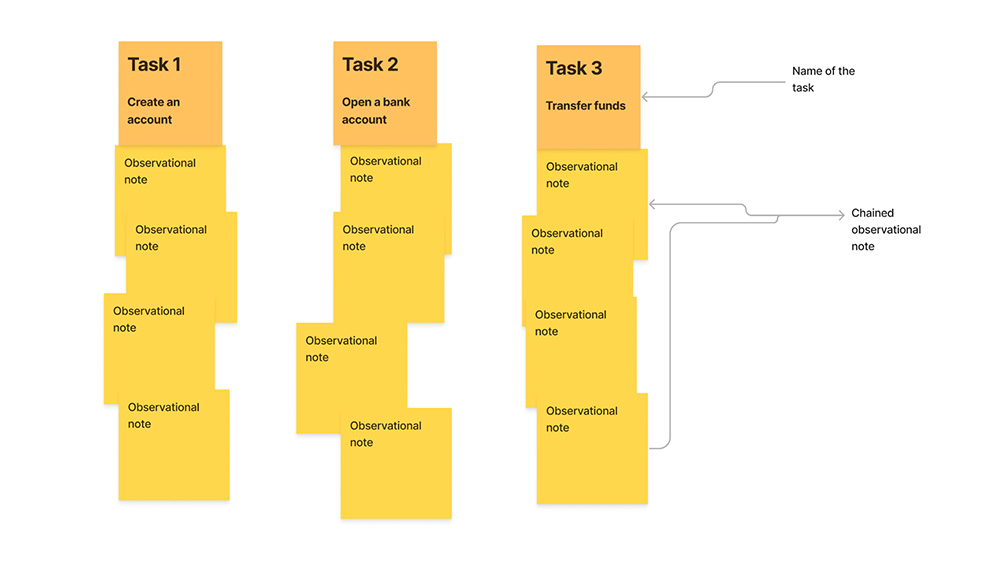
Bad tasks can ruin good research.
The biggest mistake is telling participants how to complete the task.
For example:
“Click the blue Sign Up button and create an account.”
You have already told the user what to look for and where to start. The test no longer tells you whether someone would naturally find the sign-up process.
A better task describes the user’s goal.
For example:
“You have decided to try this product for your team. Show me what you would do to create an account and get started.”
Now the participant has to find their own way through the interface.
Another example would be changing:
“Go to the pricing page.”
into:
“Your team has ten people and you want to know how much this product would cost each month. Show me how you would find that information.”
Real customers arrive with goals, not instructions.
Your test scenarios should work the same way.
Avoid using language taken directly from the interface. If your navigation includes a button called “Workspace Settings,” telling users to “open Workspace Settings” defeats the purpose of testing whether they understand the navigation.
Keep the scenarios realistic and use language your actual customers would understand.
For a 45 to 60 minute moderated session, a small set of well-designed tasks is usually more useful than rushing through a long checklist.
What Usability Testing Metrics Should You Measure?
Good usability testing metrics generally tell you three things: whether users can complete a task, how efficiently they can complete it, and how they feel about the experience.
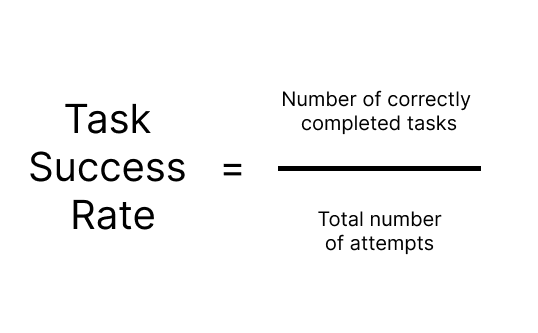
Task Success Rate
Task success measures whether a participant successfully completed the task.
This can be recorded as success or failure, or you can add a middle category for partial completion.
Do not only record whether the user eventually reached the end. Pay attention to how they got there.
Someone who completes checkout only after going backwards three times and accidentally finding the right button technically succeeded, but the experience still has a usability problem.
Error Rate
Track the mistakes users make during each task.
These might include clicking the wrong button, choosing an incorrect option, entering information in the wrong place, reaching a dead end, or misunderstanding instructions.
Patterns in errors often reveal where the interface does not match the user’s expectations.
Time on Task
Time on task measures how long users need to complete something.
The number is usually more useful when you have something to compare it with.
For example, you could compare an old checkout with a redesigned checkout, or compare your onboarding flow with an earlier benchmark.
A task taking 60 seconds is not automatically good or bad. The context tells you what the number means.
Satisfaction and Confidence
After a task, you can ask participants how easy or difficult it felt.
Simple confidence or difficulty ratings can add useful context to what you observed.
A participant may complete a task successfully but tell you they were never confident that they were doing the right thing. That is still an experience worth improving.
Raw Studio’s guide to UX metrics for high-performing products looks more broadly at how behavioural and sentiment metrics can work together when measuring a digital experience.
What Is the System Usability Scale?
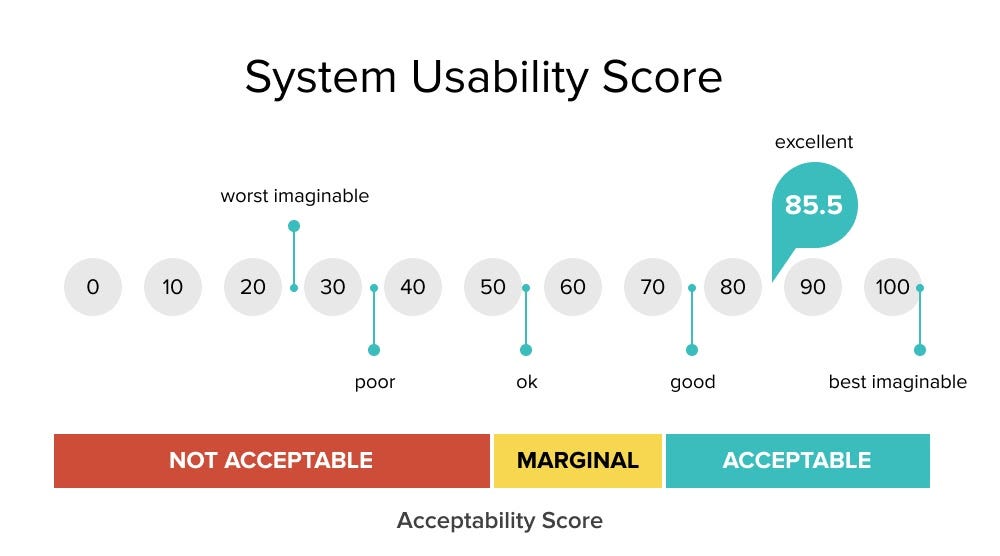
The System Usability Scale, commonly called SUS, is a standard questionnaire used to measure perceived usability.
It consists of ten statements that participants rate after using a product or system. Their responses are converted into a score from 0 to 100.
The value of the System Usability Scale is not that it explains exactly what is wrong with a product.
It does not.
Instead, SUS gives you a standardised usability score that can be useful for comparison.
You might use it to compare the old and new versions of a product, track usability over time, or benchmark one experience against another.
The score becomes most useful when paired with what you observed during testing.
A number can tell you that usability needs attention. Watching users struggle tells you where to start.
How Do You Recruit the Right Participants?
Recruitment can make or break a usability test.
Five people who closely resemble your actual customers can be more useful than fifteen convenient participants who have nothing in common with your target audience.
If your product is designed for compliance managers at financial institutions, testing it with friends, colleagues, or random internet users may produce plenty of feedback, but much of it will be irrelevant.
Recruit based on the people who genuinely use or buy the product.
Consider their role, experience level, industry, behaviour, technical confidence, and any other characteristic that affects how they interact with the experience.
Also be careful with participants who already know the product extremely well when you are testing a first-time user journey.
An experienced customer already knows where things are. A new customer does not.
The participant should match the question you are trying to answer.
How Do You Run a Session Without Biasing the User?
A moderator’s behaviour can influence the outcome without them realising it.
If someone stops and looks confused, avoid immediately explaining what to do.
Give them time.
The hesitation itself is valuable information.
Ask neutral questions such as:
“What are you thinking?”
“What were you expecting to happen?”
“What would you do next?”
Avoid questions such as:
“Does that button make sense?”
That wording encourages participants to agree with you.
Also avoid visibly celebrating when they complete a task. Saying “Perfect!” or “Yes, exactly!” teaches participants that there is a correct answer and may change how they behave during the rest of the session.
Your goal is not to help participants succeed.
Your goal is to understand whether the product helps them succeed.
The same principle applies to interviews. Raw Studio’s user interview guide covers open-ended questioning, avoiding leading questions, and getting beyond surface-level answers.
How Do You Analyse Usability Testing Results?
Once the sessions are complete, look for patterns.
Do not turn every individual comment into a separate product issue.
Instead, group similar observations together.
For example, three participants may describe the same checkout problem differently. One says the delivery option is confusing. Another hesitates for 20 seconds. A third selects the wrong option and goes back.
Those may all point to the same underlying usability problem.
Then prioritise the findings based on severity, frequency, and business importance.
Ask:
How many users experienced the issue?
Does it prevent them from completing the task?
Can they recover easily?
Does it affect a high-value journey such as checkout, onboarding, sign-up, or payment?
What is the likely business impact?
A minor inconvenience in an infrequently used settings page probably should not take priority over a checkout issue affecting three out of five participants.
Most importantly, turn findings into actions.
Usability research should not end as a slide deck that everyone reads once and forgets.
Create product or design tickets. Add evidence. Include clips from sessions where appropriate. Assign owners. Prioritise the work. Then test again after changes have been made.
Common Usability Testing Mistakes
One of the most common mistakes is testing too late.
If you wait until a product has been fully developed before putting it in front of users, you may identify serious problems when they are most expensive to fix.
Testing a rough prototype gives the team more freedom to change direction.
Another mistake is leading the participant. Tasks that tell people where to click and moderators who constantly help users through difficult moments produce reassuring results, but not useful ones.
Recruiting the wrong participants creates the same problem. Feedback can sound detailed and convincing while having little relevance to your actual users.
Finally, avoid treating usability testing as a one-time launch activity.
Products evolve. Customer expectations change. New features alter familiar journeys. Fixing one usability issue may expose another.
Testing should be part of the product development cycle rather than something reserved for a major redesign.
Test Early and Test Often
The real value of usability testing is not complicated.
Problems are easier to fix when you find them early.
Changing a prototype might require moving a button, rewriting instructions, or adjusting a flow. Finding the same problem after launch can mean redesigning screens, changing development work, updating support documentation, and dealing with customers who have already had a poor experience.
You do not need a huge research programme to get started.
Choose an important user journey. Recruit people who genuinely represent your audience. Give them realistic tasks. Watch what they do. Look for patterns. Fix the most important problems, then test again.
That simple process can reveal more about your product than another internal meeting about what users “probably” want.
Turn Usability Testing Into Better Product Decisions
Usability testing is most valuable when it changes what you build.
The goal is not to produce more research documents. It is to identify where real users struggle and give your team enough evidence to fix the right problems.
At Raw Studio, usability testing fits into a wider research and UX process that connects user behaviour with product and business outcomes. A test can uncover the friction, but the real value comes from knowing what to change next.
If you are preparing a new product, redesigning an existing experience, or seeing users drop out of an important journey, an outside usability review can help you understand what is happening before you invest in the wrong solution.
Get a free audit and proposal from Raw Studio and get a clearer view of where users are struggling, what should be prioritised, and how your product experience can be improved.
Get a UX & CRO Expert’s Eyes on Your Website. Book a free 30-minute UX Teardown and get actionable insights on what’s costing you conversions — no fluff, just fixes you can implement right away.
Book a Free UX Audit

Related posts
How Revolut Uses 4 Onboarding UX Tactics to Activate New Users Faster
Fintech onboarding must feel secure without feeling slow. A banking app cannot remove identity checks, legal consent, or account protections […]
UX for SaaS in 2025: What Top-Performing Dashboards Have in Common
You’ve probably felt it before: that moment when you open a dashboard expecting answers and instead, you’re met with a […]

Recover Abandoned Carts: 3 Checkout Optimization Fixes for Online Shops
Fix surprise costs, add guest and express checkout, and cut your form down to essentials. Those three changes recover the […]
Creative product design that gets results
Take your company to the next level with world class user experience and interface design.
get a free strategy session
